Salon → Diary is the screen to keep open all day. One day, one column per stylist.
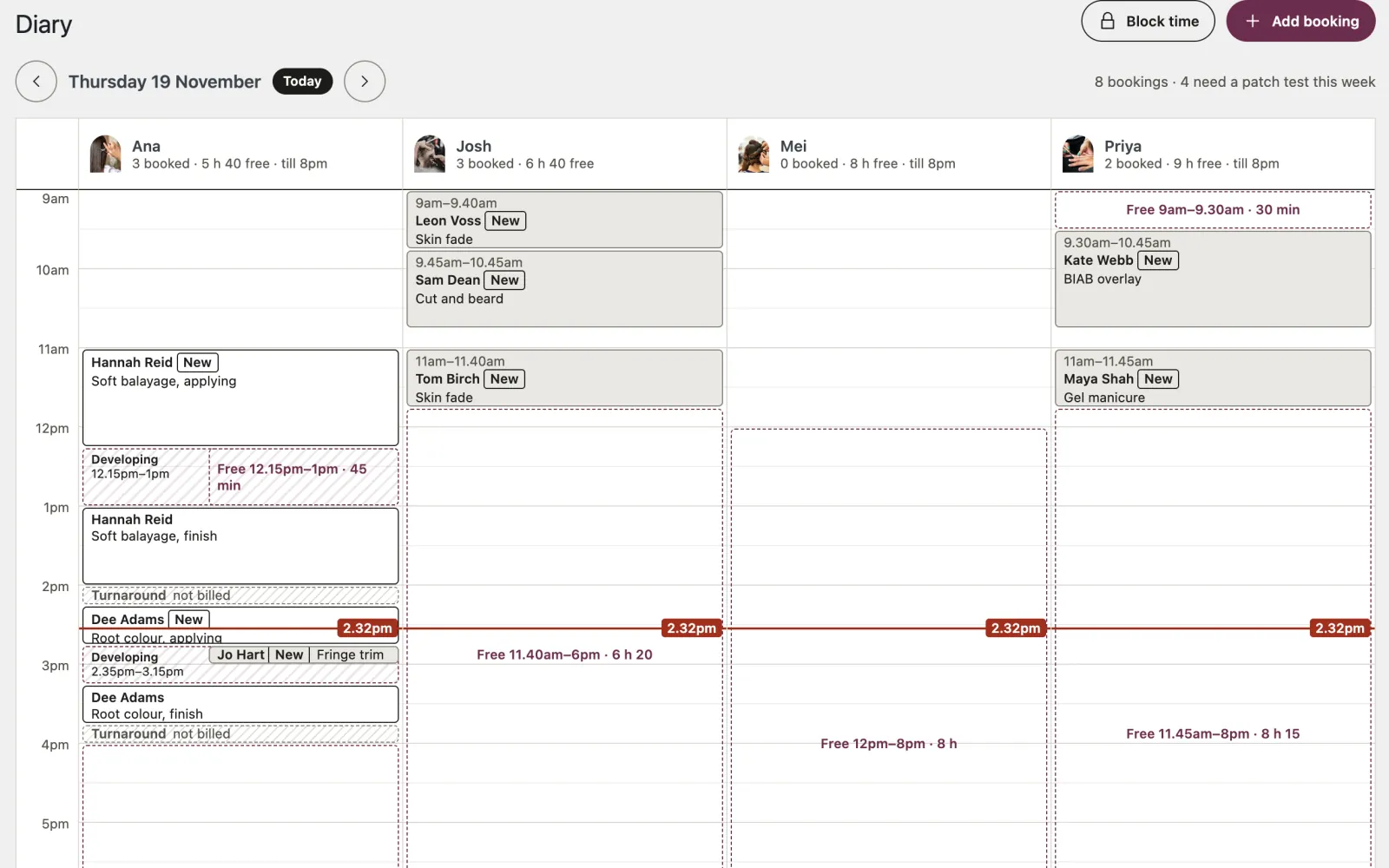
- Each appointment sits where it happens in time. New marks a client’s first visit.
- The striped strip after a colour is turnaround: blocked, not billed.
- A dashed Free box is a gap of half an hour or more inside someone’s hours: the gaps worth filling.
- A red line marks now.
- A stylist who is off that day is shaded out.
Use the arrows to move between days, and Back to today to return.
What the site brought in. Salon → Bookings opens with how many bookings clients made on the website this month, and last month; the dashboard’s At a Glance box shows this month’s. Bookings you take yourself, in the diary or on the site while logged in, are not counted, and nothing about a visitor is kept beyond the booking itself.
Taking a booking yourself
Most bookings still arrive by phone or at the desk. There are three ways in:
- Add booking at the top of the diary
- click a Free gap: the stylist, day and time are filled in for you
- Salon → Add booking
Choose the treatment, the stylist, the day and time, and the client’s name. Phone and email are optional. Without an email there is no confirmation, no reminder, and no link for the client to move or cancel: worth asking for.
The salon may do what a client may not: book outside someone’s hours, over another appointment, or with a stylist not listed for that treatment. The form says which rule you are breaking and asks you to tick Book it anyway before it saves. Squeezing a regular in before opening is your call.
Changing or cancelling a booking
Click the appointment in the diary, or Edit in Salon → Bookings. Change anything and Save changes. If the time, treatment or stylist changes, the client is emailed about it: untick the box if you have already told them. A reminder already sent for the old time is sent again for the new one.
Cancel this booking is at the foot of the same form. Cancelled bookings are kept, not deleted, so the history is still there.
Blocking time
Lunch, training, a meeting: Block time in the diary. Choose who, the day, from and to, and what for. Online booking will not offer it. Remove a block with the × on it.