Stay is a website for a few holiday cottages, cabins or rooms, run by their owners. Its one job is to take a direct booking for a run of nights, with the deposit paid, without ever double-booking against Airbnb, Booking.com or Vrbo.
Read the first three parts, installing, the setup and the checklist, before anything else. They set up everything else.
On this page
Installing
- Appearance → Themes → Add New → Upload Theme
- Choose
varnify-stay-<version>.zip, install, activate.
Activating adds an example place so you can see how finished pages look: three cottages with photographs and prices, seasons, booking terms, a booking conditions page, a house book and two example reviews. Every example is marked as one. If the site already has cottages, nothing is added.
The example is starter content: written for one of five countries (Australia, New Zealand, the United Kingdom, the United States, Canada), or, anywhere else, in neutral plain English for Other country. It is a starting point, not a check of the rules, the safety advice or the words where your cottages are. Read it through and change what is not right for you.
There is no plugin to install and nothing to buy afterwards. Stay needs WordPress 6.6 or newer and PHP 8.0 or newer. Card payments need a Stripe account (free to open; Stripe charges its fee on each payment, Stay takes nothing).
Licence and updates
New versions of Stay come from varnify.com, not WordPress.org.
- Find the licence key in your email from Varnify.
- Go to Appearance → Licence and updates, paste the key and press Save.
- A new version then shows on Dashboard → Updates and on the Themes screen like any other update, and you install it with one click. Check for updates now on the same screen asks straight away instead of waiting.
To have new versions installed for you, open Appearance → Themes, click Stay and choose Enable auto-updates. WordPress then installs each new version by itself.
To check, Stay sends your site’s address and your key to varnify.com, at most twice a day. Nothing else is sent.
If the shop cannot accept a key, the Themes and Updates screens say why in a sentence: it does not know the key (check it against your email from Varnify), the key is for a different Varnify theme, or the key was cancelled.
What your licence covers. Updates for as long as the theme is maintained. Personal support by email ([email protected]) for 12 months from purchase. Bugs you report are fixed free for as long as the theme is maintained. The theme is GPL, so you may use it on as many sites as you like; a licence covers updates for one site. “What support covers” has the details.
Set up Stay: seven steps
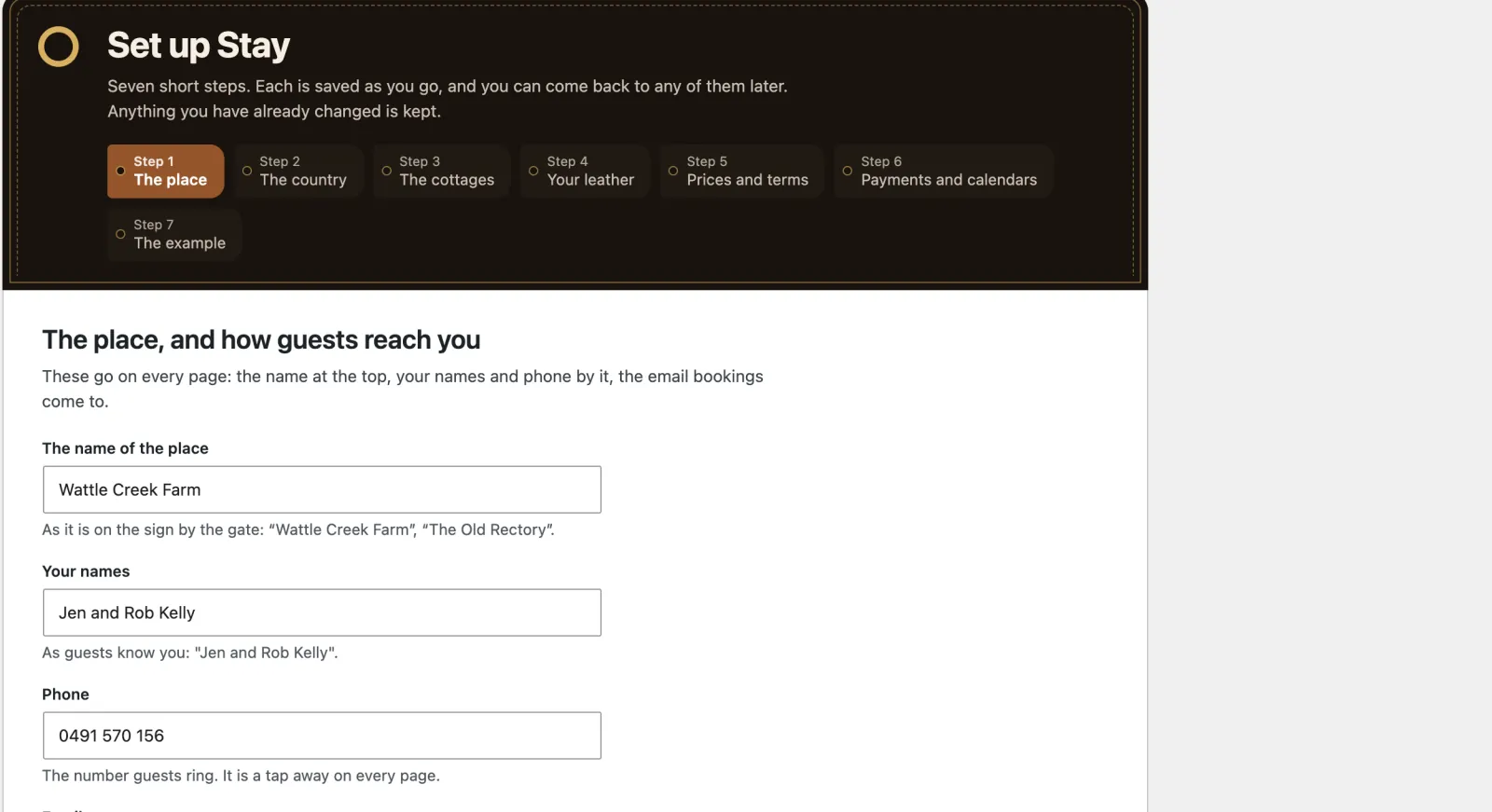
A notice at the top of the dashboard offers Set up Stay. It is also under Appearance → Set up Stay, and you can run it again whenever you like. Each step is saved as you go; you can skip any step and come back.
| Step | What you fill in | Where it goes afterwards |
|---|---|---|
| 1. The place | The name on the sign, your names, the phone guests ring, the email bookings go to, where you are (“near Tilba, NSW south coast”, not the street address); for search engines, your town, postcode, map position and (only if you want it public) your street address | Settings → General (the name) and Cottages → Your details |
| 2. The country | Starter content for Australia, New Zealand, the United Kingdom, the United States or Canada, or Other country and its facts; your state, nation or province; what your registration is called; your time zone | Currency, date format and first day of the week; Your details; Settings → General |
| 3. The cottages | Each cottage’s name, how many it sleeps, bedrooms, how many dogs, its registration number. Add new ones, or tick examples to bin them | Each cottage under Cottages |
| 4. Your leather | The one colour of your site: the leather of the fobs, the price list and the Book tag. Five leathers to pick from, or your own colour; if it would make the lettering hard to read, Stay offers the nearest shade that works | Appearance → Your leather, and Styles → Colors as “Your leather” |
| 5. Prices and terms | How much is paid at booking, when the rest is taken, arrival and leaving times, cancelling, taxes and levies | Cottages → Seasons and terms |
| 6. Payments and calendars | How guests pay: by card through Stripe, or your own ways (bank transfer, a payment link, in person) and whether the nights wait for the deposit; links to connect Stripe and link your calendars, or do it later | Cottages → Payments and Cottages → Calendar sync |
| 7. The example | Keep the example cottages for now, or take them away |
What each country sets
| Country | Currency | Usual deposit | The rest | Registration Stay asks about | Emergency |
|---|---|---|---|---|---|
| Australia | AUD | 30% | 6 weeks before | NSW STRA number; WA registration; Tasmania permit; none elsewhere. Victoria’s 7.5% short stay levy offered | 000 |
| New Zealand | NZD | 30% | 4 weeks before | None nationally; Queenstown Lakes registration | 111 |
| United Kingdom | GBP | 25% | 6 weeks before | Scotland’s short-term let licence (and the EPC rating and occupancy on every advert); Wales’s register; Tourism NI certificate; none yet in England. Edinburgh and Welsh visitor levies offered | 999 |
| United States | USD | 50% | 30 days before | Your county or city’s short-term rental permit. State and local lodging taxes offered, rate left for you | 911 |
| Canada | CAD | 50% | 30 days before | Ontario town licences; Quebec’s CITQ number and its expiry; BC registration; Nova Scotia registration. GST/HST, Quebec’s lodging tax and municipal accommodation tax offered | 911 |
| Other country | Yours, from your country | 30% | 6 weeks before | None named: write what yours is called, if you must show one. The tax you name is offered, rate left for you | The one you give; left off until you do |
These are starting points from what owners in each country commonly do, not legal advice. Check every one against the rules where your cottages are. Taxes in particular: Stay suggests the usual ones switched off, and only you can say which apply and at what rate.
Anywhere else: Other country
Ireland, Portugal, Germany, South Africa and every other country without its own starter content choose Other country. You get neutral starter content in plain international English: three example cottages with no place names, postal code rather than postcode or ZIP code, seasons called high, mid and low, arrival at 15:00. It names no regulator, no register, no tax and no emergency number, because the theme cannot know yours. The setup then asks for what it cannot guess:
- your country, from a list of every country
- your currency, filled in from your country (change it if you price in another), and the symbol shown before prices
- the emergency number to show (fire, police, ambulance), written the way people dial it there; two numbers are fine (“112 or 999”)
- your state, province or region, for search engines, if you like
- a tax on stays, by name (VAT, IVA, tourist tax), if you charge one: it is offered as a line on the bill under Prices and terms, where you set the rate yourself
- what guests must do on arrival, only if the law where you are asks something of them (“Please bring a passport or ID card for each guest; we must register every guest.”), in your own words
- and, as for every country, what your registration is called, if you must show one, with each cottage’s number in step 3
Nothing is guessed. Leave the emergency number empty and your booking conditions and house book leave out the emergency line rather than show a wrong one. The same goes for the tax and the arrival rule. Your dashboard lists what is still missing, and Cottages → Your details marks each empty fact Not set, until you add it. The example prices are numbers in your own currency: replace them with yours.
Check your starter content
After the country step your dashboard says what you chose is starter content, with links to the places to change it: your cottages, your booking conditions, the house book, Cottages → Your details → Country, wording and safety lines, the front page, and prices and terms. For Other country it also lists the facts still missing. Click I have checked it once you have read it through. (A site updated from Stay 1.0 keeps its country and content as they were and does not show this, unless you run the setup again.)
Country, wording and safety lines, at the foot of Cottages → Your details, is where the country lives after setup: your country, the facts above, and the lines the theme writes for you (the front page headline and opening line, the walk from the gate, getting round inside, getting here, what you add to cancelling and dogs, and the whole-price sentence). Change any of them to your own words; empty a box to put the starter wording back. They show on your front page until you change it in the Site Editor. Words written for one country go when you change country.
With an AI service connected, Adapt my starter content can suggest the changes for you: see “Working with an AI assistant”.
Running it again
Running the wizard again never undoes your work. Changing country rewrites only the example cottages, booking conditions, house book pages and settings nobody has changed: every example keeps a fingerprint of how it was installed, and anything you have edited (a cottage’s words, its prices, the booking conditions) is yours and is left alone. An example cottage is rewritten in place for the new country, so it keeps its address (the old one redirects), its fob number and any bookings made while you tried the site out. The currency always follows the country. A move to Other country also takes the examples’ registration numbers off every cottage: an example’s number is never a real one.
Make the site yours
After the wizard, a list called Make the site yours stays at the top of the dashboard until it is done. Most items tick themselves:
- your details are no longer the example’s;
- no cottage, and not the front page, still shows an example photograph;
- every cottage has its registration number (if your country and region need one);
- you have been through your terms, taxes and levies;
- the booking conditions have been edited (even a little);
- Stripe is connected;
- every cottage has at least one calendar linked;
- the house book is written, every cottage has a door code, and real reviews have replaced the examples;
- you have chosen your fonts, or kept the theme’s;
- a time zone is chosen, the privacy policy is published, and a test email arrived.
Items the site cannot see for itself (you hand keys over instead of a door code; you take bookings only here) have a Done button. Hide this list removes it from the dashboard.
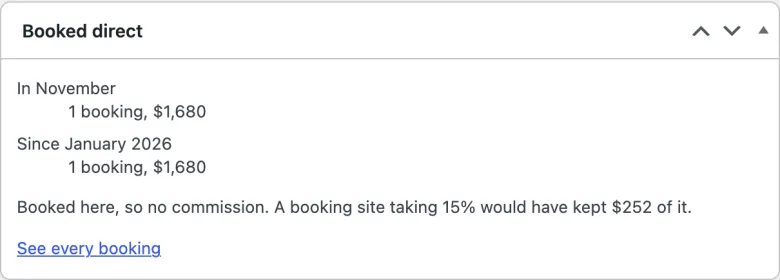
Booked direct. A box on the dashboard counts the bookings guests made on your site this month and since January, what they come to, and what a booking site taking 15% would have kept of it. Only booked stays count: not requests waiting for you, cancellations or the example’s bookings.