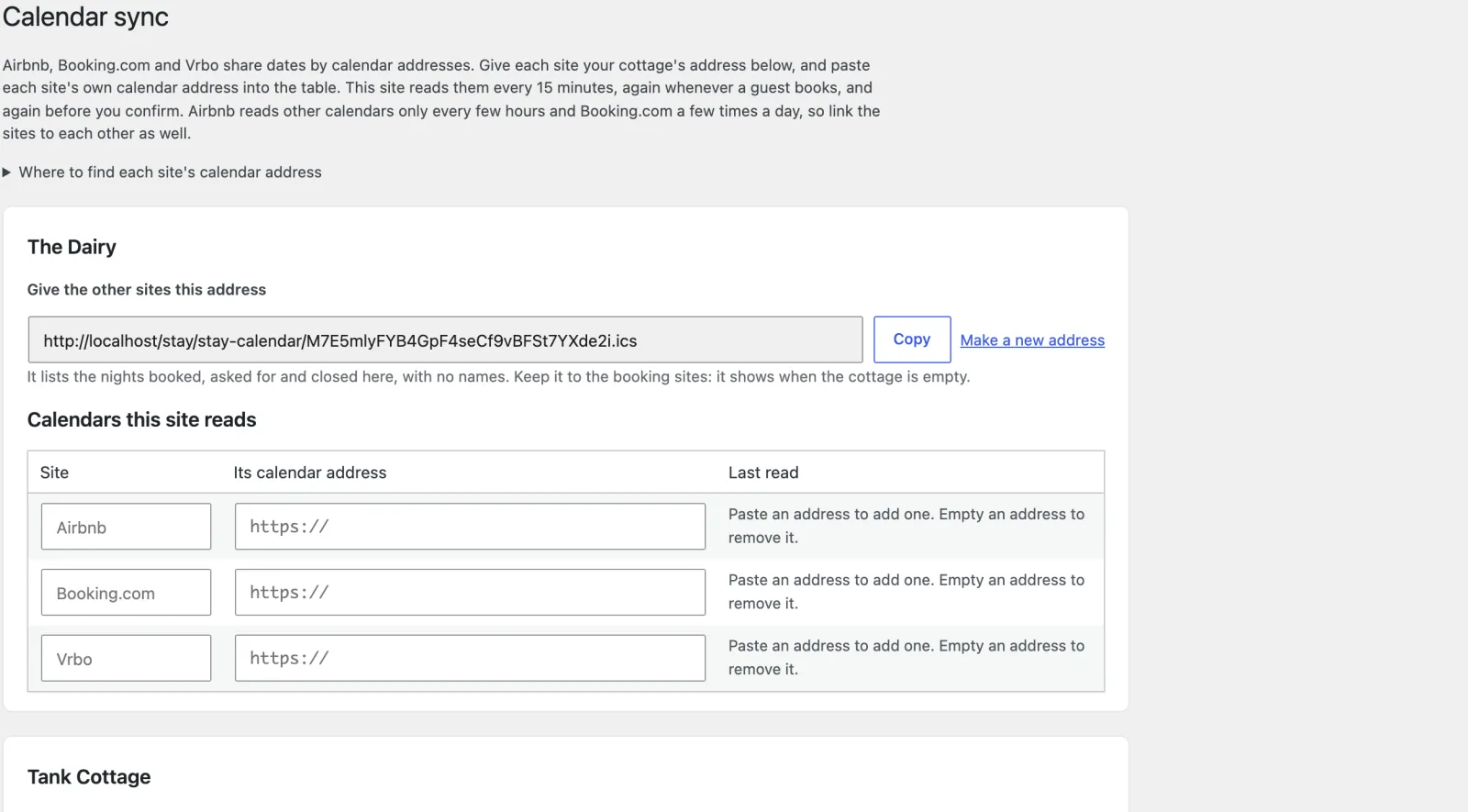
Cottages → Calendar sync. Each site shares dates by a calendar address (iCal). For each cottage you do two things: paste each site’s address into Stay, and give each site Stay’s address.
Airbnb
- In Airbnb: Calendar, choose the listing, Availability, then Connect calendars (or Sync calendars).
- Export: copy Airbnb’s link. In Stay, under that cottage’s Calendars this site reads, write “Airbnb” as the site name and paste the link as Its calendar address.
- Import (Connect to another website): paste Stay’s address for the cottage (Give the other sites this address, then Copy). Name it after your site.
Booking.com
- In the Extranet: Rates & Availability, then Sync calendars, then Add calendar connection.
- Export the calendar of booked and closed dates and paste its address into Stay.
- Import Stay’s address there. Booking.com may refuse calendars from some personal websites; if it does, close the nights you sell here on Booking.com by hand.
Vrbo
- In Vrbo: Calendar, then Import and export.
- Export gives Vrbo’s address: paste it into Stay.
- Import calendar: paste Stay’s address.
Press Save and read new calendars. Each one then shows when it was last read.
Link the booking sites to each other too. Stay passes on only bookings made on your own site, never what it read from the others, because calendars that echo each other leave “ghost” blocks that never clear. So Airbnb must also read Vrbo’s and Booking.com’s calendars, and so on.
The honest limits
iCal is the only way the booking sites share calendars with a site like yours, and it is not instant:
- Stay reads each calendar every 15 minutes, again when a guest starts booking, again when they ask to book or pay, and again before you confirm. WordPress runs its schedule when someone visits, so on a quiet site ask your host to run WordPress cron every 15 minutes.
- The booking sites read Stay’s calendar on their own timetable: Airbnb about every three hours, Vrbo about every 30 minutes, Booking.com a few times a day. Until they do, a night just booked here still looks free there.
- So a double booking is possible, in the window between a booking on one site and the others reading it. It is rare for a few cottages, and most likely for last-minute nights.
- Your buffer is the notice you ask for (Seasons and terms → Notice: guests cannot book online for tonight or tomorrow if you need two days) and, on Airbnb, Preparation time and Advance notice. Stay has no automatic gap night between bookings; close one by hand (Bookings → Add a booking or close dates) if you want it.
- When it goes wrong, you hear about it loudly. An overlap between a booking here and nights read from another site emails you at once, with both bookings named. A calendar that fails twice running, or has not been read for three hours, emails you once and stays on every admin screen until it reads again. A failed read never opens nights: the last dates read stay blocked.
The address Stay gives out shows when the cottage is empty, so give it only to the booking sites. Make a new address replaces it if it gets out; every site must then be given the new one.