Fill in where you are
Restaurant → Where you are.
The name in the rail and the line under it are your site title and tagline, set under Settings → General: not here. There is only one of each, so there is only one place to write them.
- Telephone: shown in the header (on wide screens) and as a tile on the front page and Find us, a
tel:link on phones. Half of your bookings will come this way; do not hide it. - Address: the front page, Find us, the footer and your rubber stamp.
- Finding us: what a map cannot say. “The door is down the side, past the bike racks.” This is the one people thank you for.
- Parking: the second most common question.
- Access: steps, the width of the door, whether there is an accessible lavatory. Say what is true, including when the answer is no. Somebody who arrives in a wheelchair to find three steps has had their evening ruined by your website. “One step at the door, 82cm wide, no accessible lavatory, we are sorry, and we would rather you knew” is a good page. Silence is not.
These appear on the Find us page.
Decide how you take bookings
Restaurant → Reservations.
If you take reservations
Leave it on “Yes: guests send a request and we answer it.”
The request form is letter tiles: how many, which day (this week as tiles, closed days crossed out, or “A later date”), and roughly when (times you are not serving that day are crossed out). The board beside it on a wide screen repeats the request so far. The board on the front page has tiles too: party sizes by day, tonight’s times in the evening, each going to the form with that choice already made. Counter takes requests, not bookings. It has no table plan, so it never tells anyone they have a table. Both the page and the emails say so plainly: “This is a request. Nothing is held until we reply and confirm it.” Leave that wording alone. A guest who thinks they have a table and arrives to find they do not will blame you, not the software.
- A large party starts at: eight by default. At that size the form becomes an event enquiry with different questions: roughly how many, roughly when, what the occasion is. A table for twelve is a conversation about a set menu and a deposit, not a slot.
- Send requests to: leave empty to use the site administrator’s address.
- Acknowledge the guest: sends them a short email saying it arrived and that nothing is held yet. Keep this on.
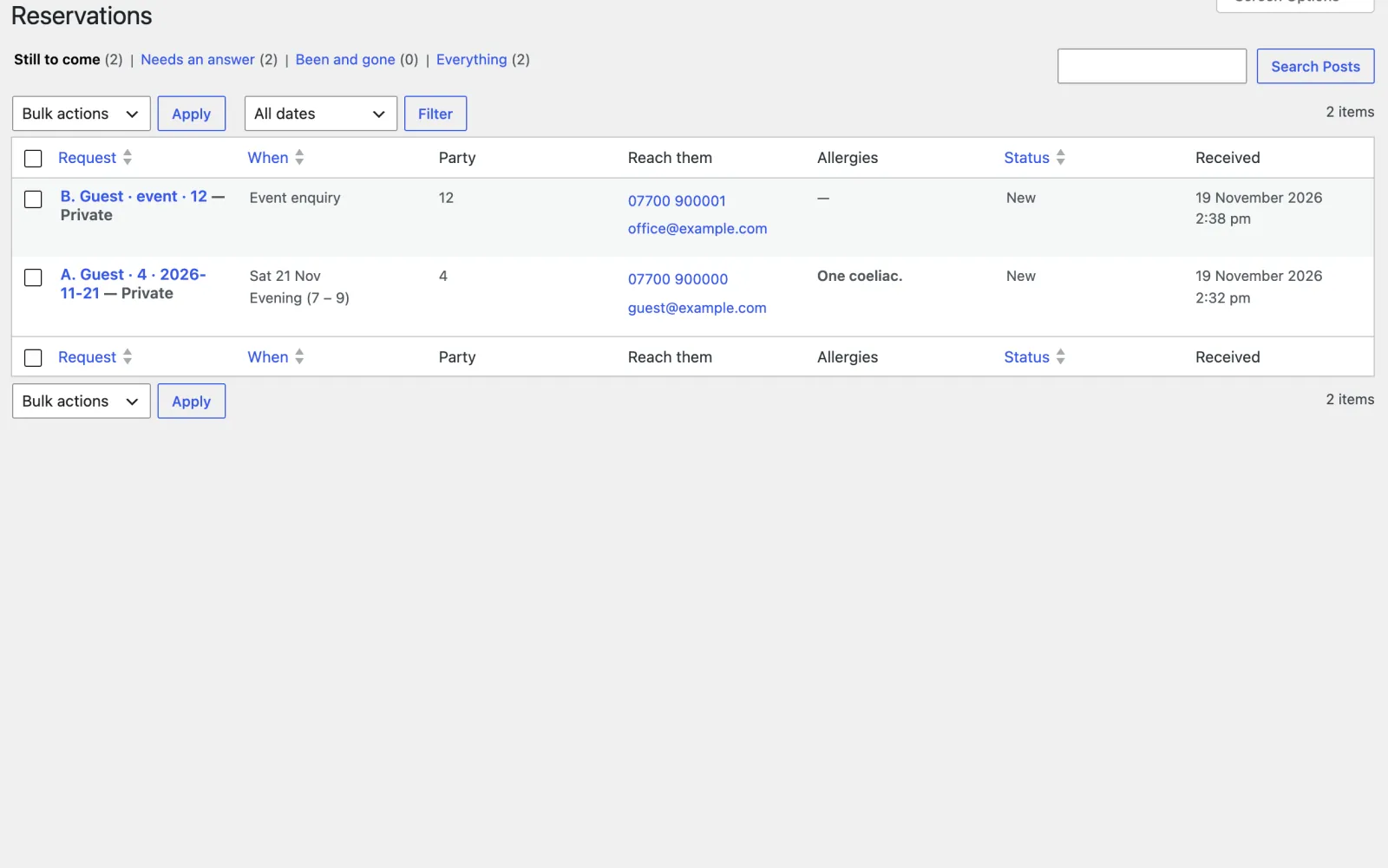
Requests arrive under Restaurant → Reservations, ordered by the day the table is wanted rather than the day the request arrived, because somebody asking today about November should not sit above somebody who asked yesterday about tonight. Four ways to look at the pile, across the top:
- Still to come: everything from today onwards. Where you will live.
- Needs an answer: everything you have not yet marked as dealt with.
- Been and gone: the past, most recent first.
- Everything.
The list shows the day and sitting, the party size, their telephone number as a link, and any allergies in bold. Sort by the day or by the status by clicking the column heading. Open one to set where it has got to: New, Confirmed, Offered another time, Could not do it, or Did not turn up.
The form checks itself before it sends. A missing name or a mistyped email is pointed out under the field, the first one is focused, and nothing is sent until it is right; the server checks the same things again in the same words. A form that comes back faster than a person can fill it in (bots do that) is held, with a plain “send it again”; with the browser’s script on, a quick guest’s request is simply sent a moment later. Nobody is ever shown a thank-you for a request that was not sent.
Counter does not send the answer for you. Replying is a person writing to a person, and a restaurant that automates it will confirm a table it cannot seat.
Tables kept for walk-ins
Most bistros take requests and keep a few tables back. Tick We keep tables for walk-ins as well and say how, in your own words (“Two seats kept at the counter for walk-ins.”). The line appears in the board’s Tables column, on the booking page and in the footer.
An outside booking service
If you already use OpenTable, Resy, SevenRooms or any other service, put its link in An outside booking service with its name. Counter shows a plain link beside the request form: “Or book instantly on OpenTable”. Tick Make it the header’s Book button too if you take every booking through it.
It is a link, never an embedded widget: a widget loads the service’s scripts on every page, slows the menu down and follows your guests about. Leave the field empty to use only Counter’s request form. It is off unless you fill it in.
If you do not take reservations
Choose “No: every table is for walk-ins”, then fill in About the room underneath: how many seats, when it is busy, when it is quiet.
The booking page becomes the walk-in board (“No bookings. Just walk in.”) with those facts as its lines, and the header’s main button becomes Find us.
Those three facts are what turn a walk-ins policy from a missing feature into a decision. Without them the page reads as broken. They are also used on the gallery page when you have no photographs.
Structured data will tell map cards that you take no reservations, so nobody is offered a booking button that nobody will answer.