What happens when a couple enquires
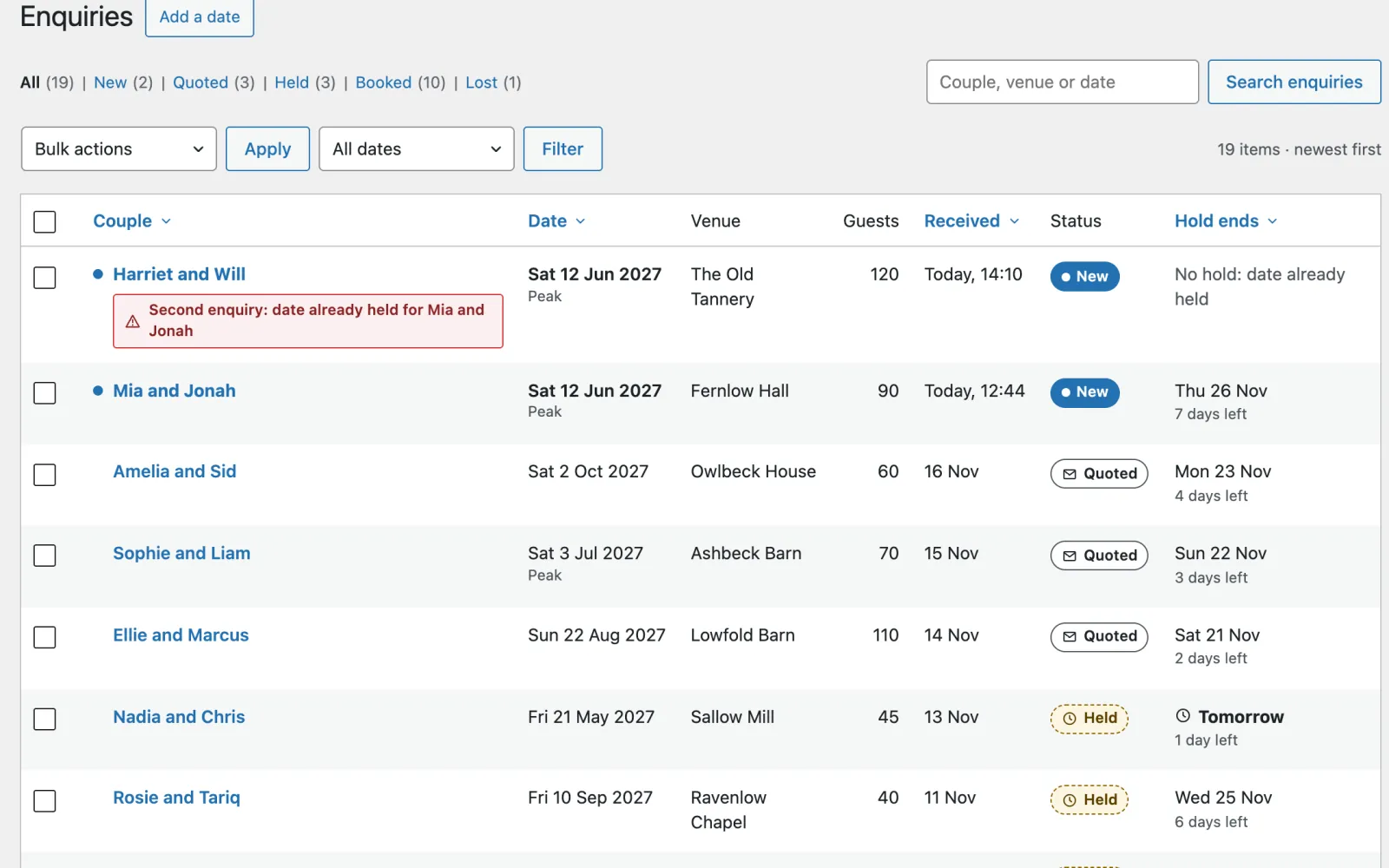
- They send the form from Enquire for this date.
- The date is held for them (pencilled in) for the number of days in Dates → Settings → Holds (7 by default). It now shows as not free.
- They get a copy of what they sent, saying how long the date is held.
- You get the enquiry by email, with their address to reply to.
If someone else took the date while they were filling in the form, nothing is lost: everything they wrote is kept, and they are offered the nearest free dates.
Dates → Enquiries
Five statuses, and only five:
| Status | Means | The date |
|---|---|---|
| New | Just arrived | Held while the hold lasts |
| Quoted | You have sent a quote | Held while the hold lasts |
| Held | Pencilled in by you | Held while the hold lasts |
| Booked | Confirmed | Taken until you change it |
| Lost | They went elsewhere, or you said no | Free |
A hold ends by itself at midnight on its last day, and the date shows as free again. You are emailed the day before (untick Email me the day before a hold ends if you’d rather not). The Hold ends column shows how long each has left.
A second enquiry for a date already held is kept, flagged, and holds nothing. You decide; the first couple keeps their pencil.
One enquiry
Open an enquiry to see everything they sent. From there:
- Send quote: a reply already filled in with the package they chose and the price for their date. Change anything, then send. It marks the enquiry Quoted; the hold doesn’t change.
- Draft the reply for me: with an AI service connected (“The AI helper, and assistants”), a warm reply drafted from this enquiry alone, into the message box for you to read, change and send. Nothing is sent to the couple until you press Send.
- Extend hold: more days, when they need longer to decide.
- Mark as booked: the date is theirs.
- Release date and mark as lost: the date is free again straight away.
The history at the foot records what happened, and when.
How couples pay
Dates → Settings → How couples pay (or step 5 of Set up Date). Date takes no money itself and can’t see a payment arrive. Say how you get paid, and it tells each couple after they enquire: on their thank-you page, in their email and in your quote. Wedding suppliers usually take a deposit or retainer of 25 to 50% to book a date, by invoice or bank transfer; this fits that. Leave it as it is and nothing changes: couples pay you as you arrange, and the site says nothing about money.
Ways to pay (tick any):
- Pay in person or on the day. On unless you tick another way.
- Bank transfer. Type your bank details exactly as your bank gives them; every country writes them differently. Couples see them only after they enquire (on their own thank-you page, which only they can open) and in emails; never on your public pages. Date adds a reference for each enquiry, its number and the couple’s last name (
107 LAWSON), so you can match the payment. - A payment link. The address of a payment page from any provider you already use (a Stripe Payment Link, PayPal.me, Square, Mollie, Razorpay, your bank’s pay page), starting
https://, and optionally the words on its button (Pay the retainer if you leave it empty). Couples get a button on their thank-you page and the link in emails. Date adds no payment code, holds no keys and takes no fee. An address that doesn’t start withhttps://is not saved, and the screen says so.
Deposit or retainer (your country’s word): none, an amount, or a share of the price for that date (the package the couple chose, or the price you quote), in your site’s currency, rounded to the nearest coin (25% of 2,250 is 562.50) and never more than the price. It is asked for only when bank transfer or a link is on, and only on enquiries from the website and quotes you send: dates you add yourself are yours to settle. With no price yet (“Not sure yet”), a share is asked for in your quote, which has the price.
Until it’s paid, one of two:
- Keep the date pencilled in until I mark the retainer paid (the default). The couple is told the amount, how to pay, and the day their pencil lasts until (your hold length). When the money reaches your account, open the enquiry and press Mark retainer paid: the date is booked in ink and the couple is emailed. If it is not marked paid by the end of the hold, the pencil is rubbed out by itself at midnight, as every hold is, the date is free for others again, and the couple is emailed to say so (within the hour; if they reply and the date is still free, extend the hold and they are asked again). Mark as booked still books a date without waiting, and emails nobody.
- Don’t wait: the retainer request is information only. Couples are told the amount and how to pay, but nothing waits for it: pencils end quietly when their hold does, as they always have, and you mark dates booked yourself.
With bank transfer or a link but no retainer, the ways to pay go in your quote under How to pay.
Each enquiry that was asked for a retainer has a Retainer box: the amount, whether it is due (and by when), paid, or let go, and Mark retainer paid. Date can’t see money arrive: check your bank or your payment provider first. If the pencil ran out and the date has since gone to another couple, Date won’t book it over them and says so. Turning payments on never writes to couples who enquired before.
Dates → Add a date
For bookings that come by phone, by email or at a wedding fair.
- Hold it for a number of days: it lets go by itself when the hold ends.
- Book it: confirmed.
- Block it: a day off, or a date you won’t take. No couple attached.
Add their email if you have it, and they get the same hold email as an online enquiry. The panel beside the form shows what else is on that weekend.
Dates → The year
Twelve months at once. Each date shows what is on it (booked, held with the days left, blocked, a full weekend, out of season, a day you don’t work), with peak dates marked and today ringed. Select a date to see what is on it and on its weekend, and to hold, book or block it.
With a keyboard: the calendar is one tab stop. The arrow keys move by day and week, Home and End to the ends of the week, Page Up and Page Down by month.
The morning summary
Dates → Settings → Morning summary. A short email at seven each morning with new enquiries and holds ending soon.