Answers “are you free?”WordPress theme for wedding suppliers

Date

For wedding photographers, florists, caterers, bands and small venues. A couple asks for their date and the page answers at once: free, with your price for that day, or the nearest days you are.

Version 1.0.0Answers enquiries and asks for retainers, no CRM subscription

Date on a desktop screen
Date on a phone

The main job

A couple asks if you’re free, and gets the answer

Couples often ask on a phone, in the evening, with several suppliers open at once. Date answers on the page, with the price for that day, and holds the date while you reply.
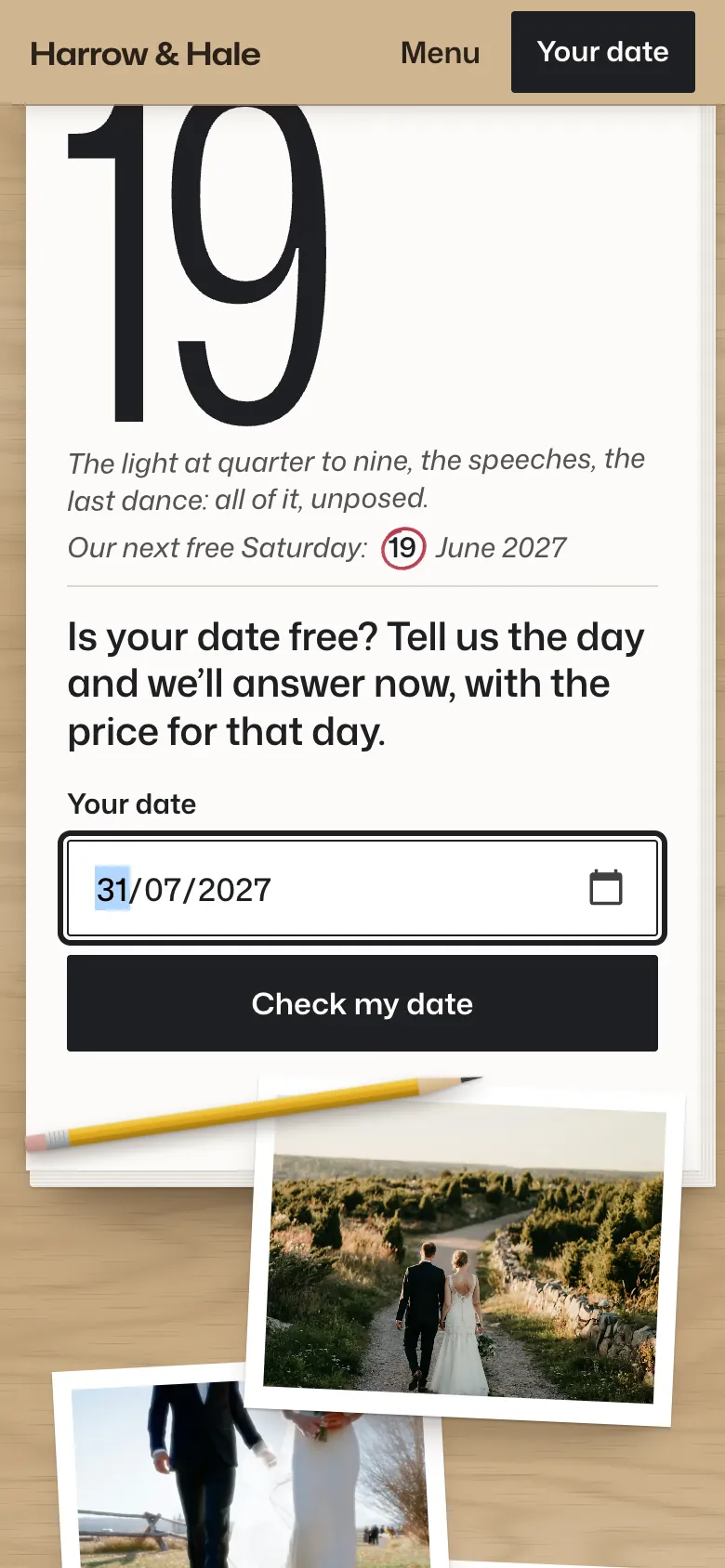
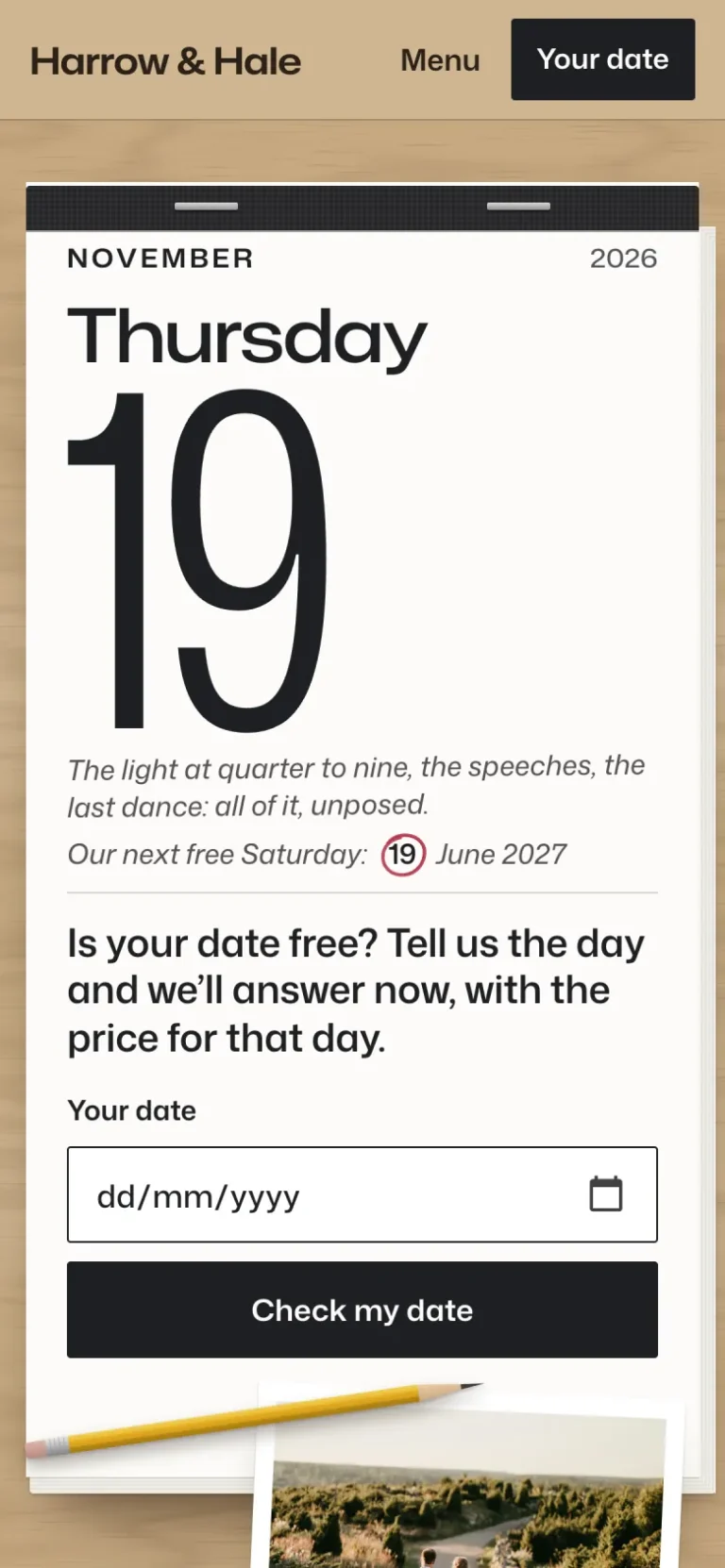
The diary leaf on a phone with 31/07/2027 typed into Your date, above Check my date and a yellow pencil
Ask the diary. The front page opens at today, and the couple types their date into the leaf.
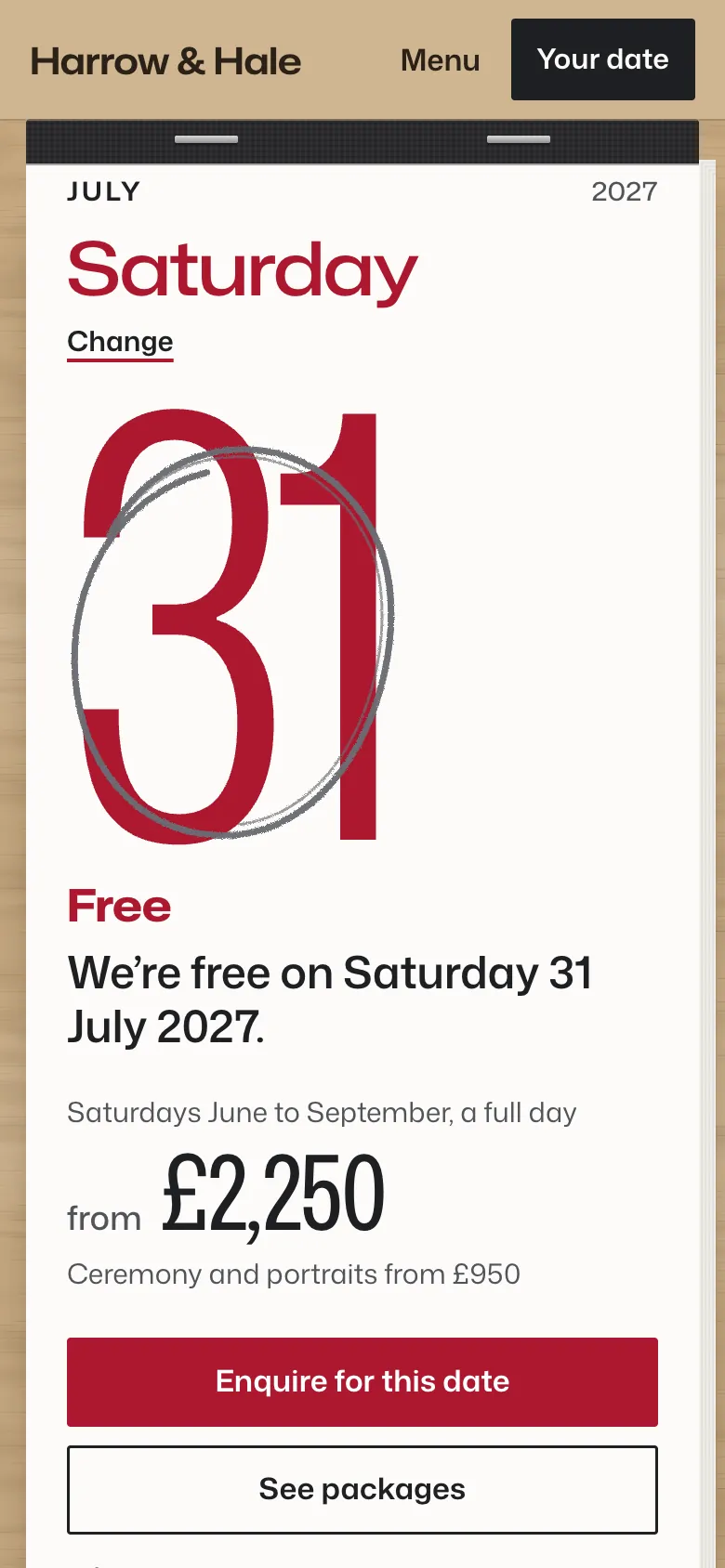
The leaf torn to Saturday 31 July 2027 on a phone: the numeral in red, ringed in pencil, Free, “We’re free on Saturday 31 July 2027”, from £2,250, and Enquire for this date
Free, with the price. Their day prints in your red, ringed in pencil, with what a full day costs on that date.
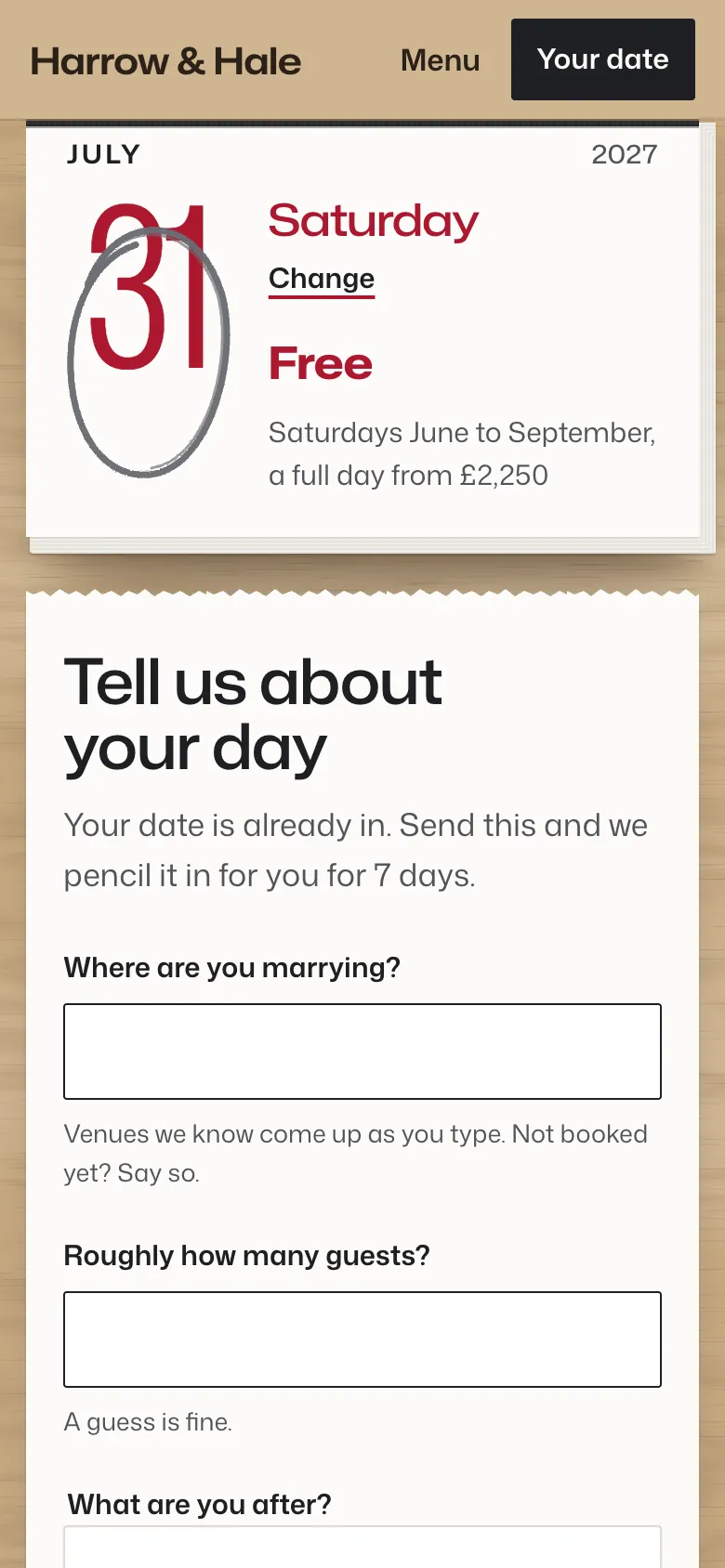
The enquiry on a phone: a small leaf for Saturday 31 July, Free, and the form “Tell us about your day”, which says the date is already in and will be pencilled in for 7 days
Tell us about your day. The date is already in, so the form asks only who they are, how to reach them, the venue, the guests and what they’re after.
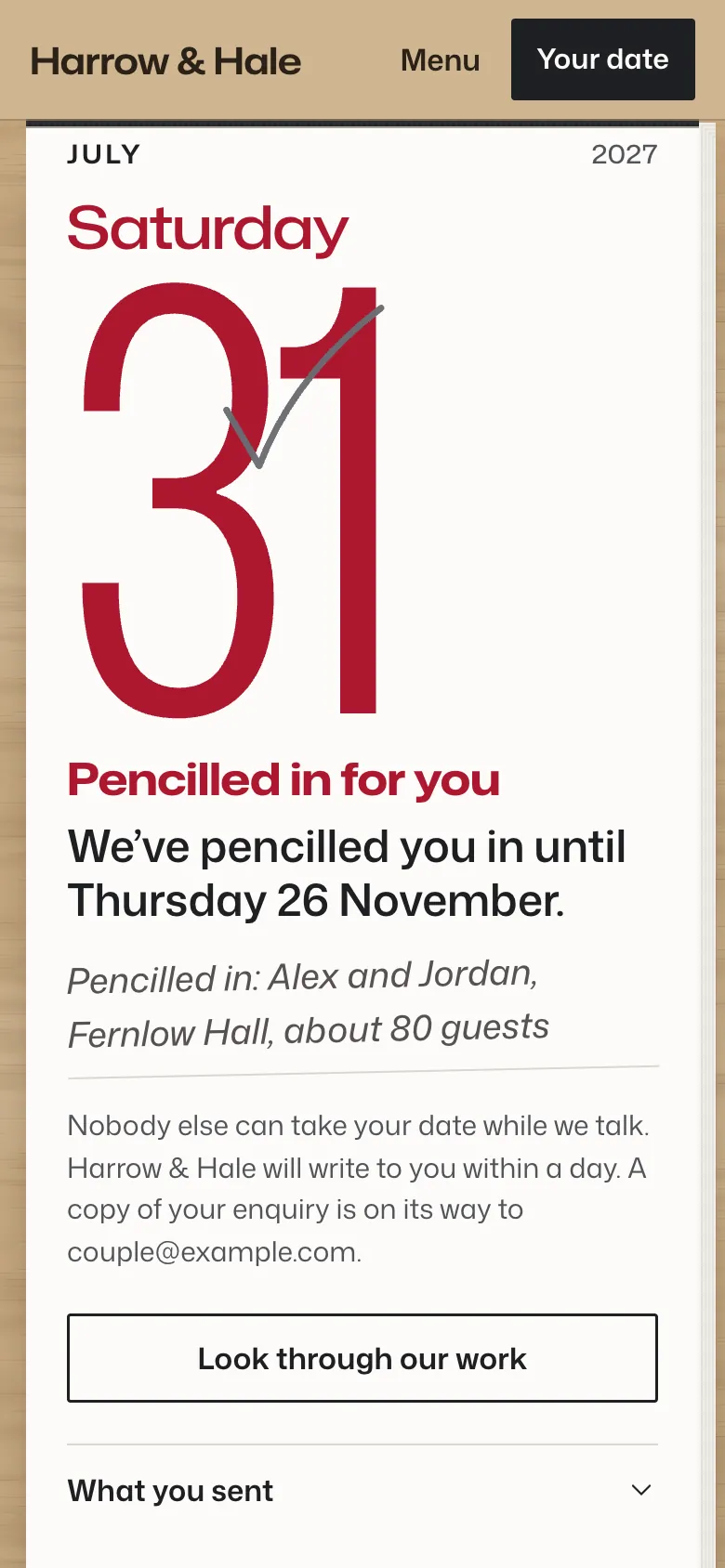
The sent page on a phone: 31 in red with a pencil tick, “Pencilled in for you”, held until Thursday 26 November, and the couple’s entry: Alex and Jordan, Fernlow Hall, about 80 guests
Pencilled in. Sending holds the date for them, seven days by default, and their page shows their entry in your diary.

The design

A day-to-a-page diary, open at today

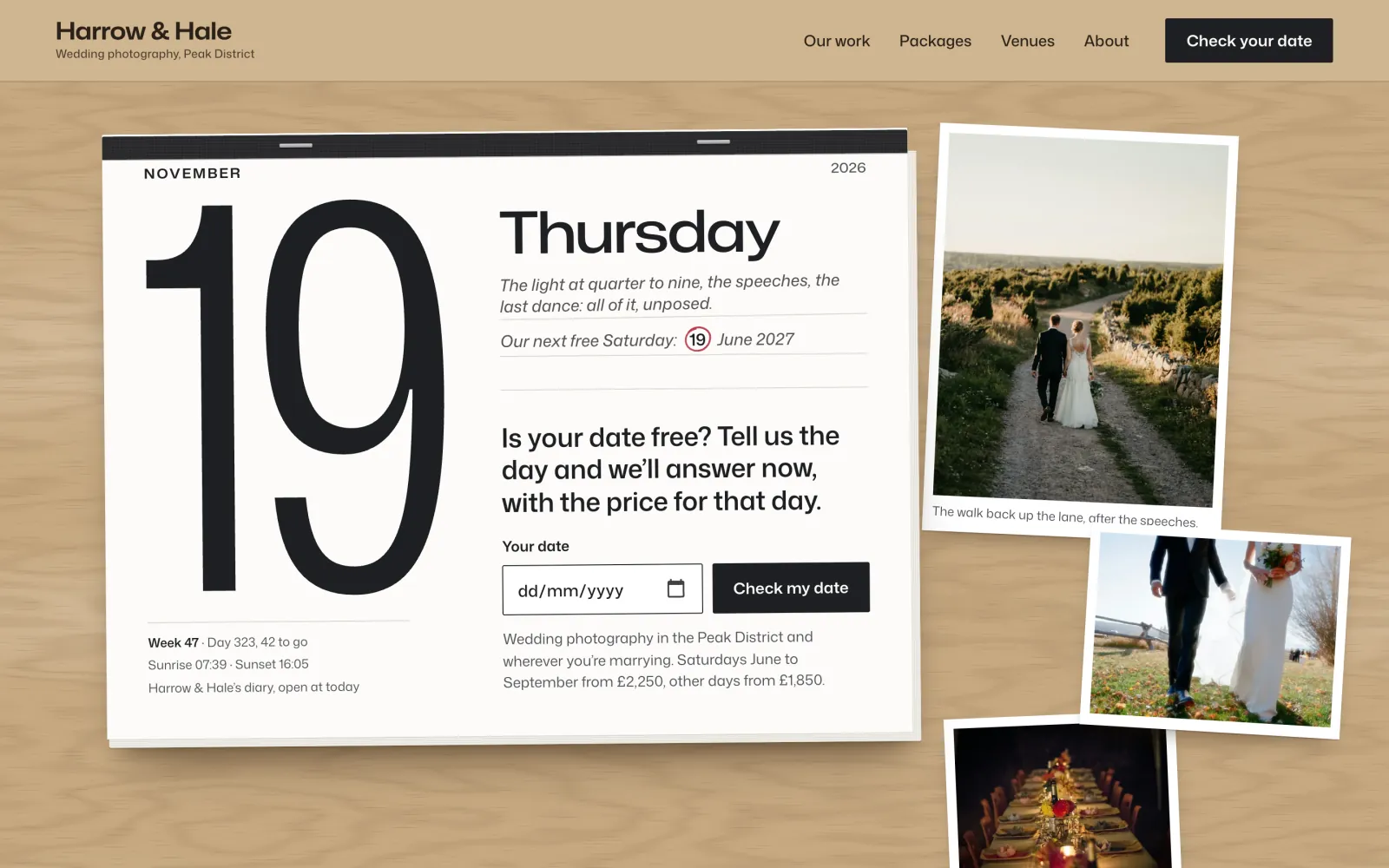
Your front page is a tear-off desk diary on a pale oak desk, with your photographs laid beside it as prints and a yellow pencil. The date check is written on the leaf. Pick a date and the page tears to it.
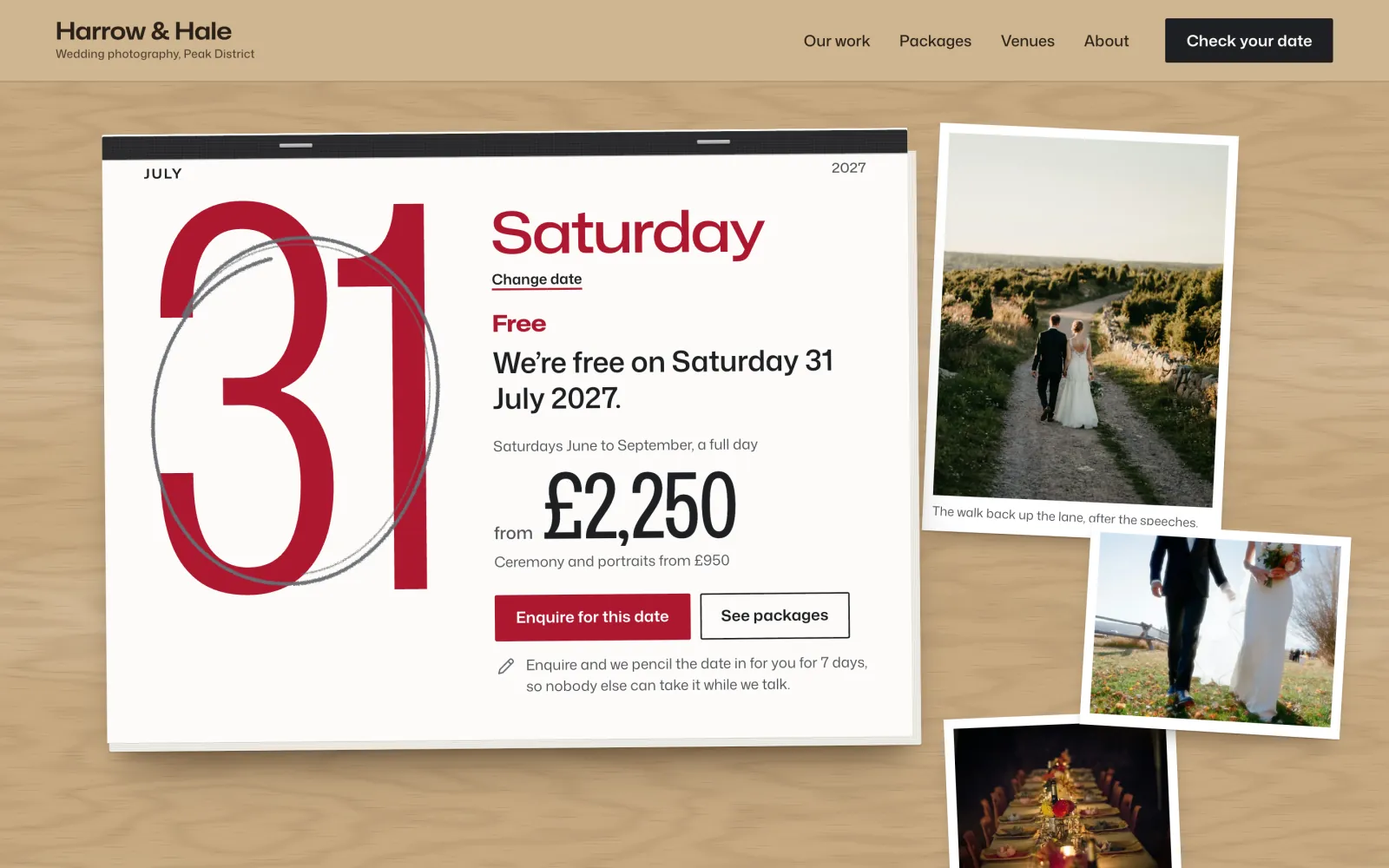
The front page on a desktop answering Saturday 31 July 2027: the red numeral ringed in pencil, Free, from £2,250, Enquire for this date and See packages, with prints on the oak desk
A red-letter day: a free date prints in your red, ringed in pencil, with Free and the price for that day.
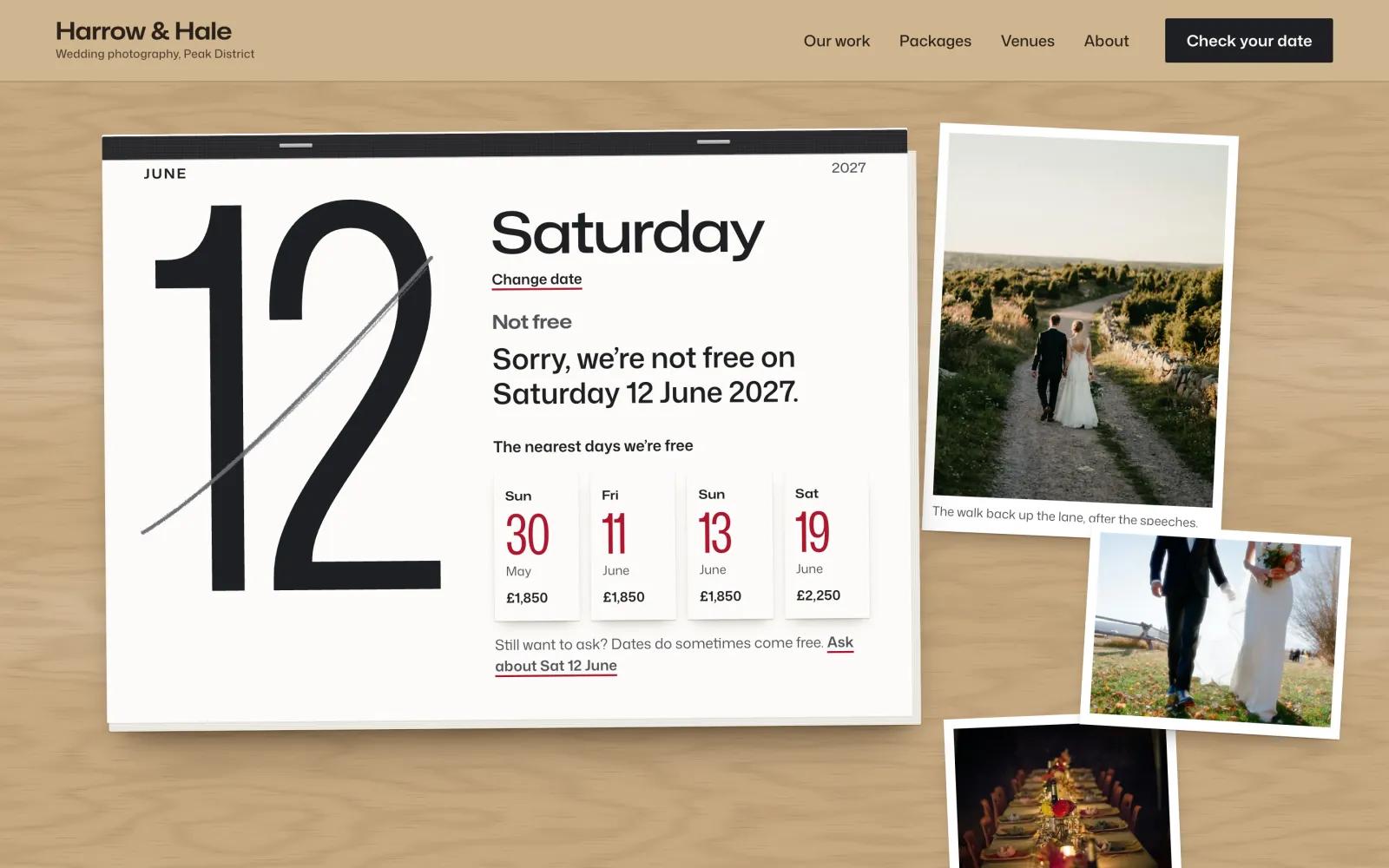
Saturday 12 June 2027 on the front page: the numeral struck through, “Sorry, we’re not free”, and four small leaves for the nearest free days, 30 May, 11, 13 and 19 June, each with its price
Not free. The numeral is struck through and the nearest free days lie beside it as small leaves. Booked, held and blacked out all look the same, so nobody can read your diary.
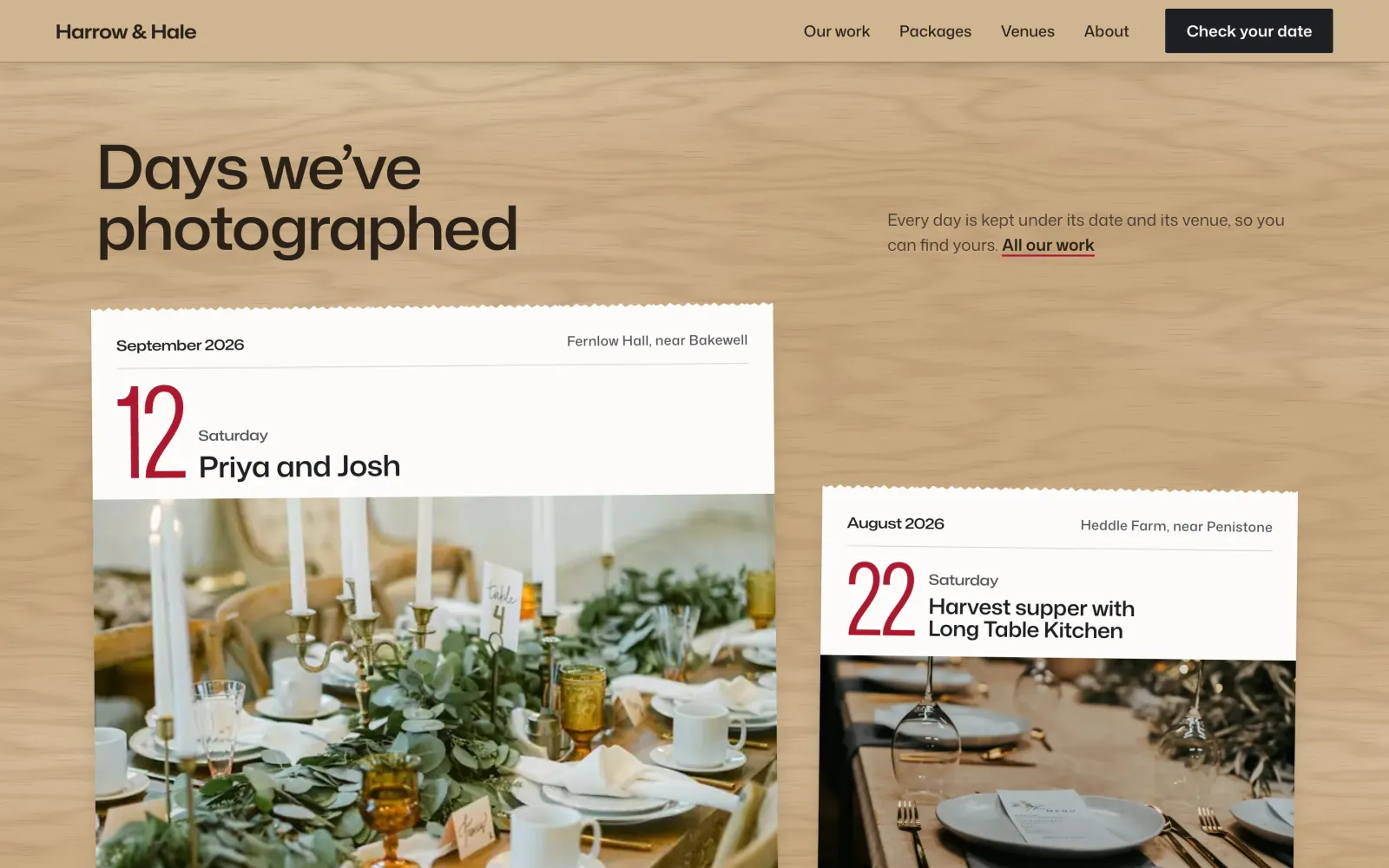
Days we’ve photographed: leaves of paper headed with a red date, the couple and the venue, over photographs of a wedding table and a harvest supper
Days you’ve worked. Each is a leaf with its date, the couple and the venue, because couples look for their own venue.
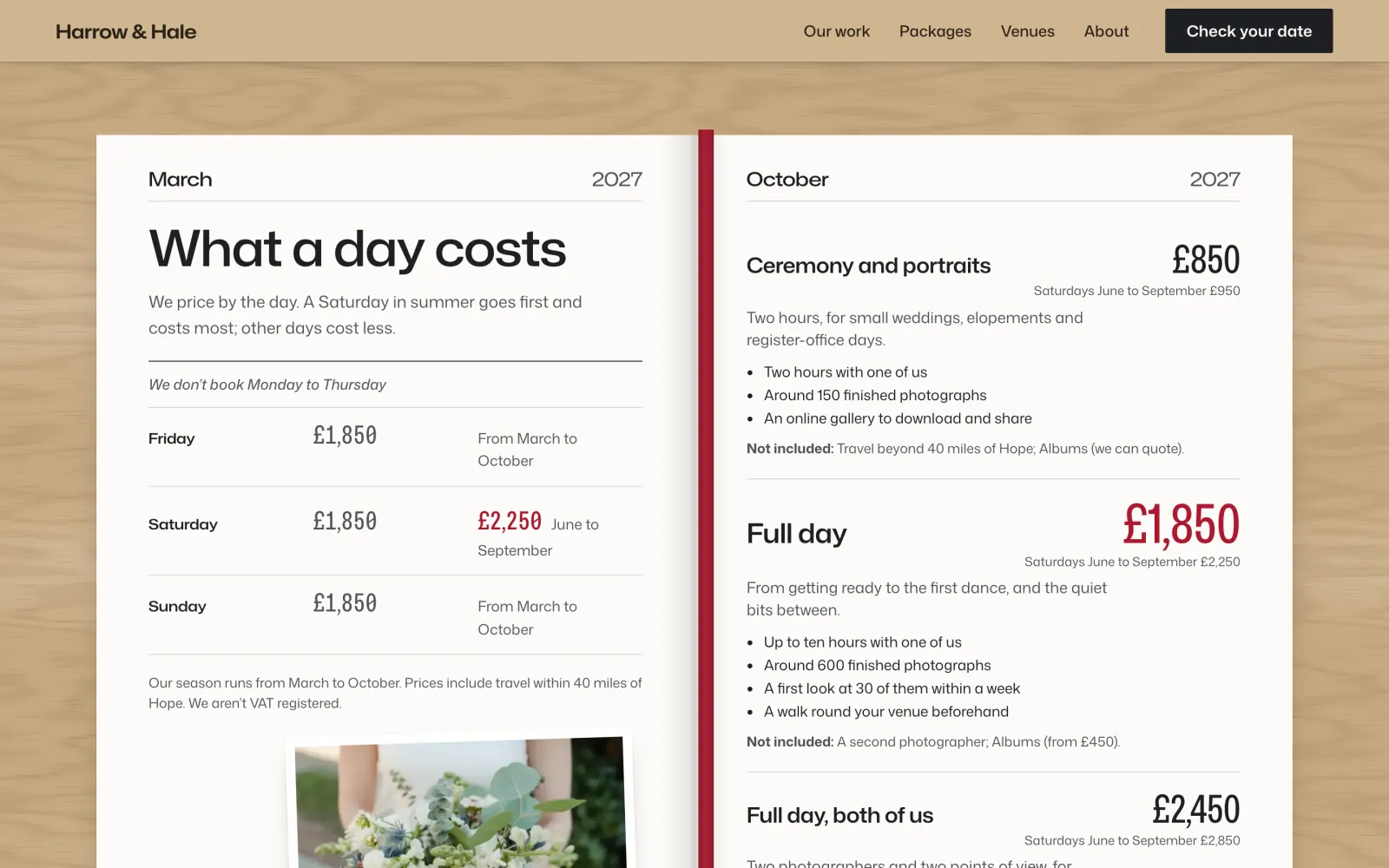
What a day costs, as a week to view: Friday, Saturday and Sunday prices on the left page, three packages on the right, and a red ribbon down the gutter
A week to view. What each day costs, with your packages on the facing page and a ribbon in your red.

Your colour and type

Your red, and your own fonts

Date has one colour: your red. It prints a free date’s numeral, the price, your main buttons and links, and the ribbon in your prices. Pick crimson, claret, cranberry, holly or graphite, or your own. If yours is too light to read, the screen says so and offers the nearest shade that passes, the same hue a little deeper.

Type works the same way. Choose one of three sets made for a diary (Diary, Almanac and Planner), or any Google font through WordPress’s own Font Library, served from your own site. The numeral and the price step down to fit, wide font or narrow. The desk can be oak, flax linen or graphite felt.
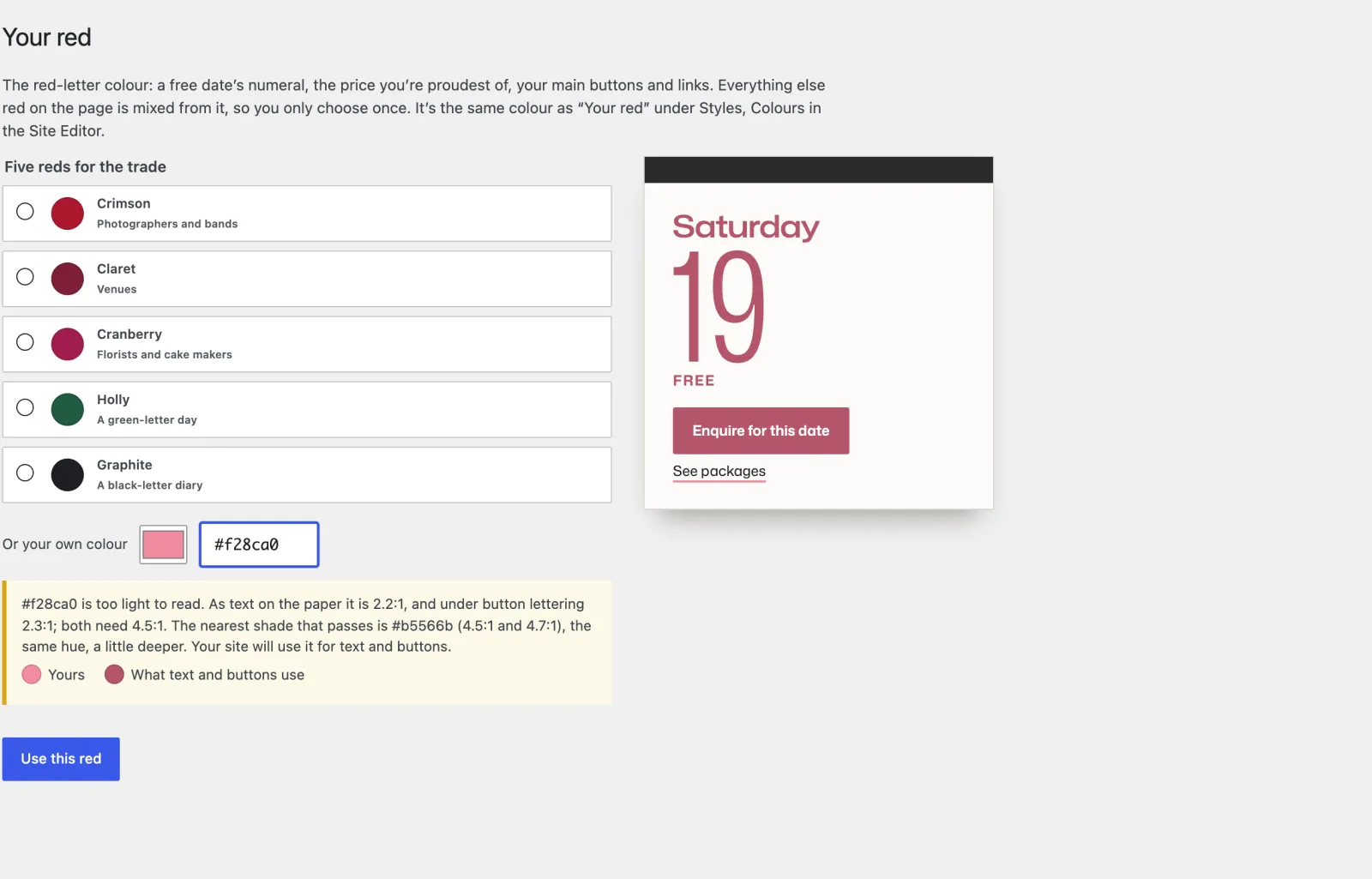
Appearance, Your red: five reds from crimson to graphite, a custom colour #f28ca0, a warning that it is too light to read, and #b5566b offered instead, with a preview leaf
Too light to read: the screen measures it and offers the nearest shade that passes.

Your side of it

Your diary, in the dashboard

Set up Date asks about your business, your red, where you are, your season and prices, and how couples pay, with starter content for the UK, the US, Canada and Australia, or Other country for anywhere else. After that, your year, enquiries and settings are under one Dates menu.
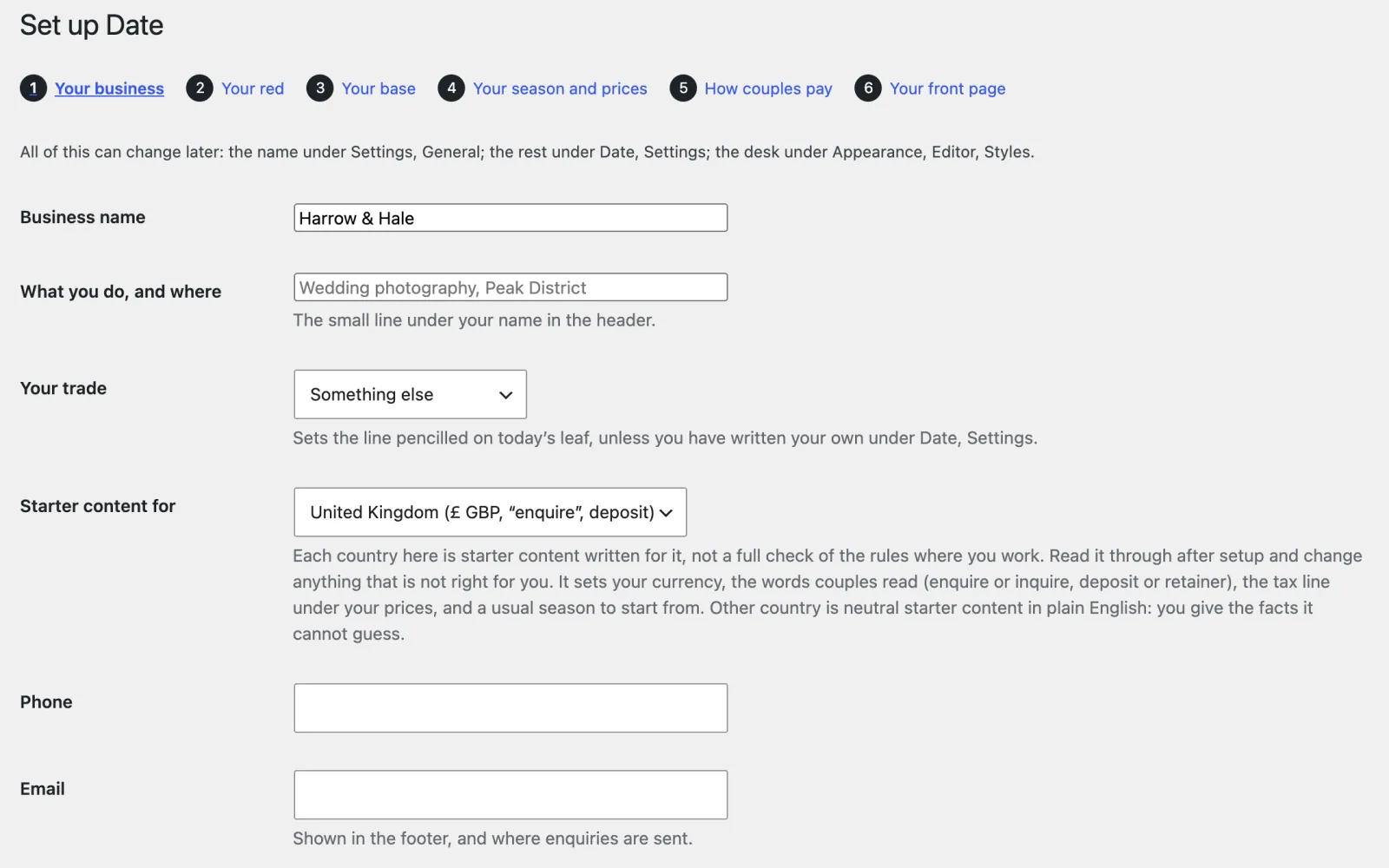
Set up Date, the first of six steps: business name, what you do and where, your trade, the country, phone and email
Set up Date. Short screens, each one skippable and changeable later: your business and trade, your red, your base, your season and prices, how couples pay, your front page.
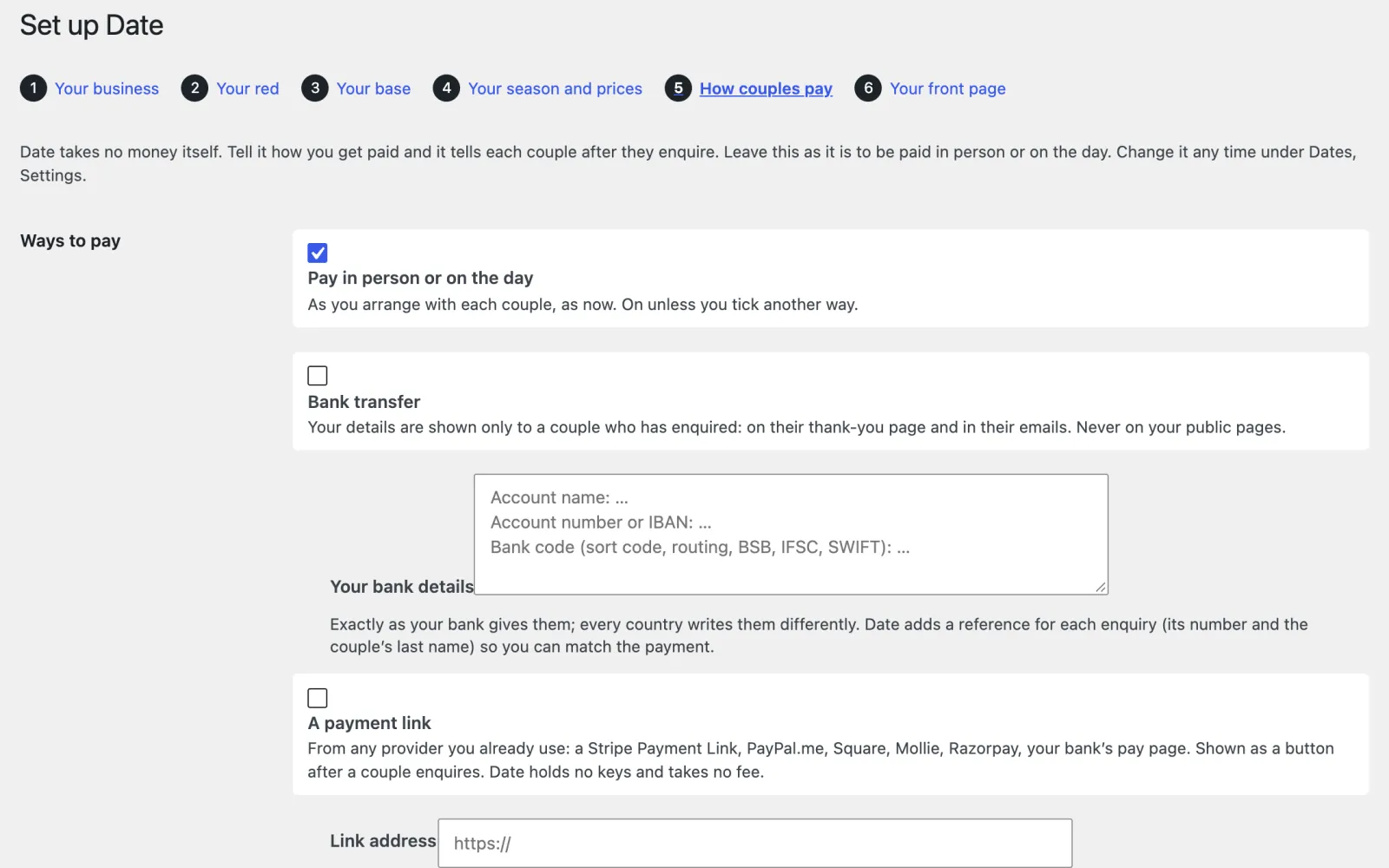
Set up Date, How couples pay, the fifth of six steps: in person or on the day, bank transfer or a payment link
How couples pay. In person or on the day, by bank transfer, or through a payment link from any provider, with a deposit or retainer if you want one.
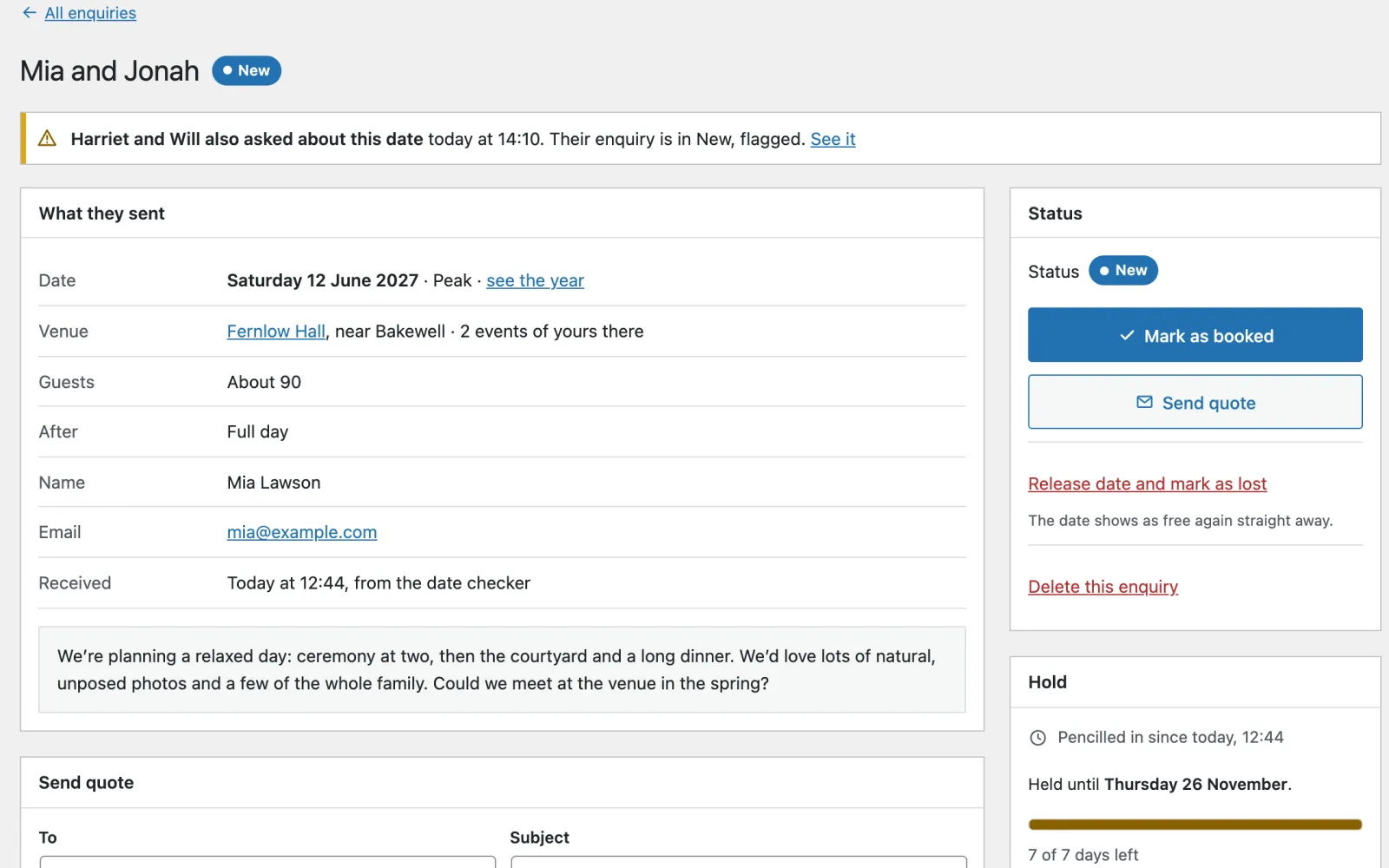
One enquiry, Mia and Jonah for Saturday 12 June 2027: what they sent, a note that another couple asked for the same date, Mark as booked, Send quote, and the hold with 7 of 7 days left
One enquiry. Everything the couple sent, Send quote filled in with the package and that day’s price, and how long the hold has left.
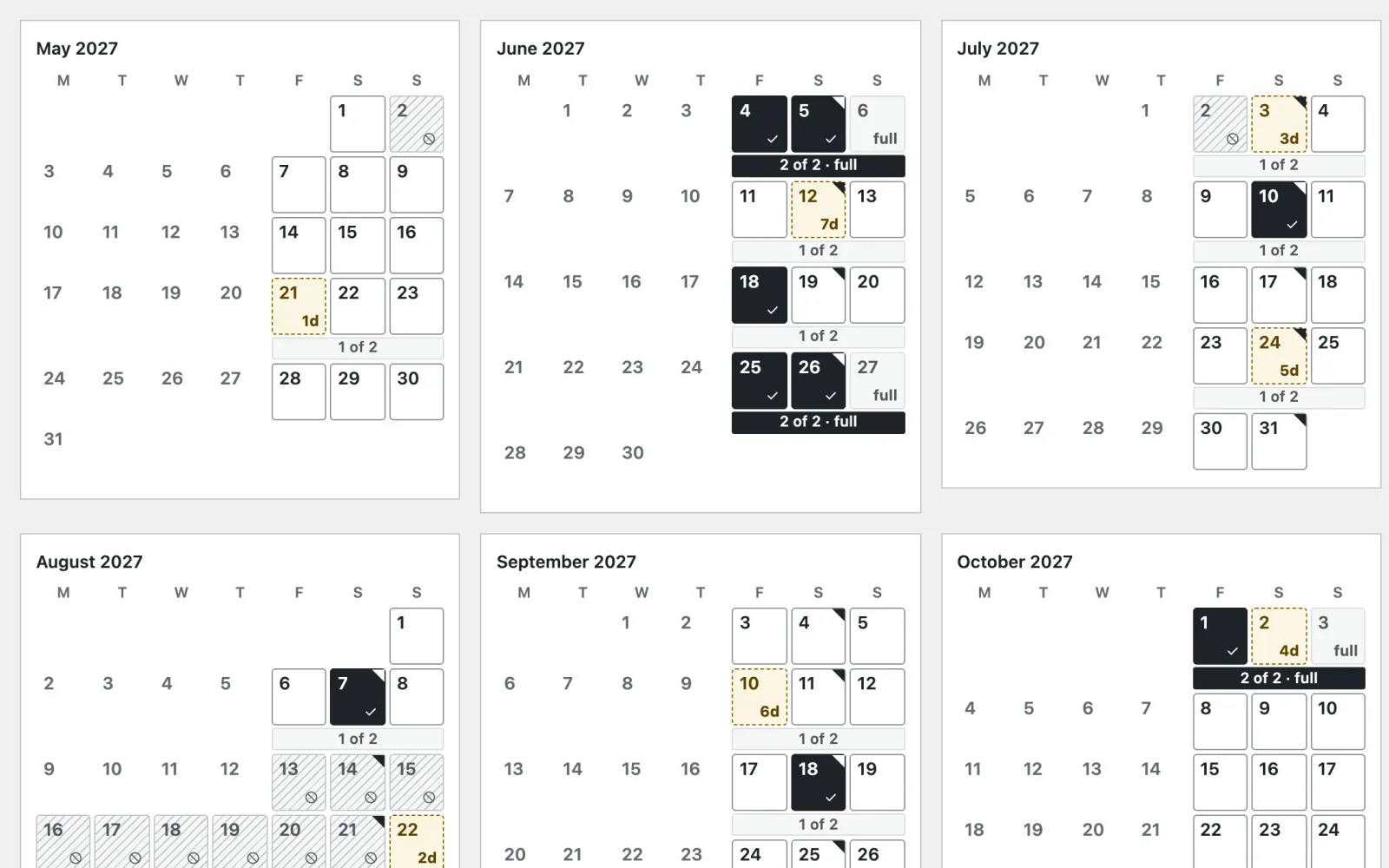
The year, May to October 2027: booked days in black, held days with the days left, blocked days hatched, and full weekends marked
The year. Twelve months at once: booked, held with the days left, blocked and full weekends. Select a date to hold, book or block it.
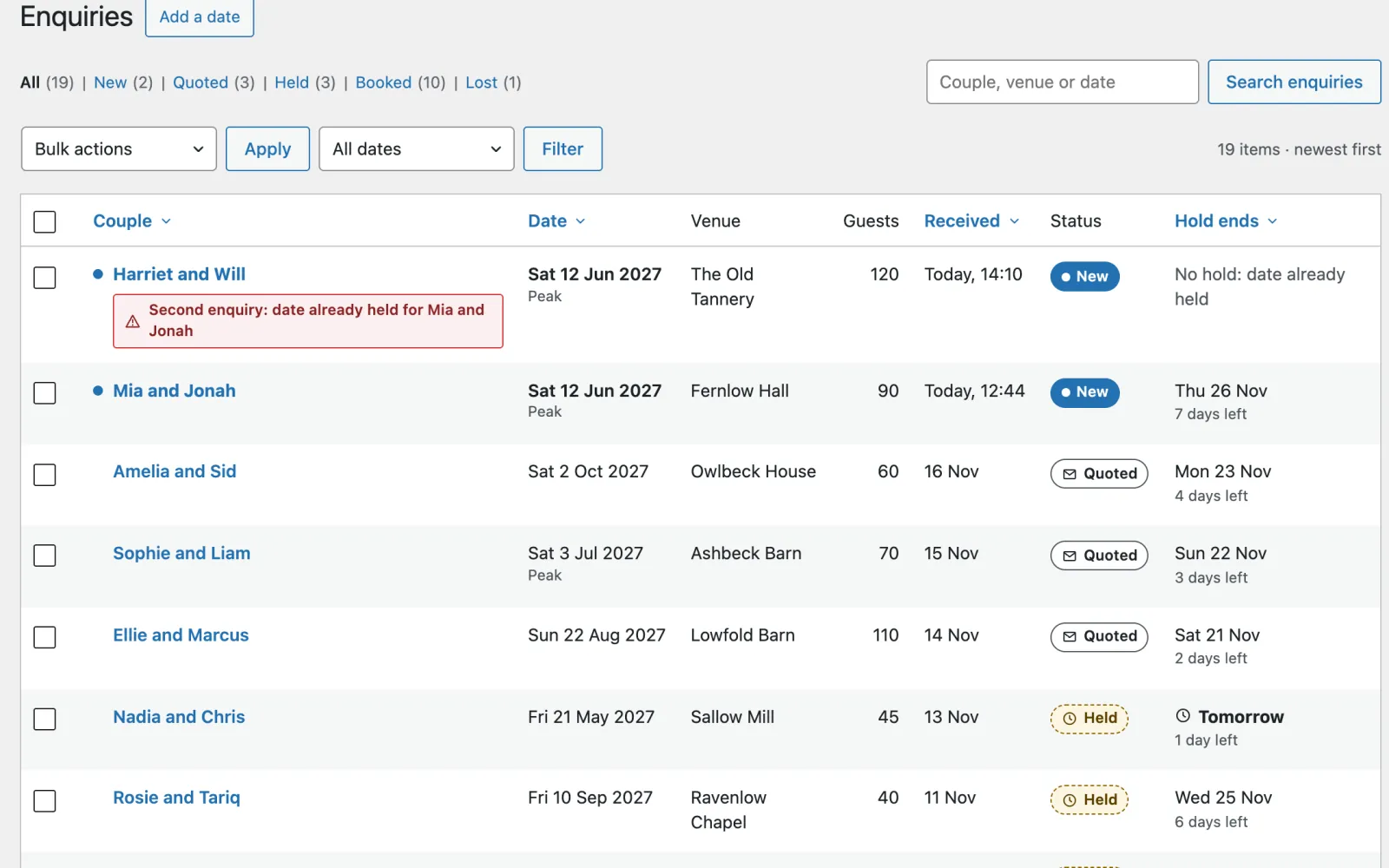
Enquiries: nineteen couples with their date, venue, guests and status (New, Quoted or Held), and when each hold ends
Enquiries. New, Quoted, Held, Booked or Lost. A hold ends by itself at midnight on its last day, and you are emailed the day before.

The bill it ends

Couples often book whoever replies first. Date is $79, once.

When a couple fills in a contact form and hears days later “sorry, we’re booked”, they have usually moved on, and you have spent an evening on a dead lead. Some suppliers pay a subscription for a CRM such as HoneyBook or Dubsado to keep track of it all, which is far more than a florist doing thirty weddings a year needs. Date is not a full CRM. It answers on the page, the moment it is asked, and keeps track of enquiries and retainers.

What each “are you free?” costs you now

a reply, written by hand every one

a date you were already booked a dead lead

a couple who heard from someone else first the booking

a CRM to keep track of enquiries by subscription

Date, paid once $79

Date takes enquiries, asks for retainers and holds dates. It is not a full CRM: it has no contracts or invoices, so if your CRM does those for you, keep it.

Speed and access

Quick on a phone, and usable by everyone

  • 100 Lighthouse performance, accessibility, best practices and SEO on a phone, for the front page, with its largest element drawn in 0.9 seconds.
  • 99 Lighthouse performance on a phone for a day of work with its photographs.
  • 27 page types clean in axe (WCAG 2.2 AA) at phone and desktop width, every answer of the date check included, and the enquiry’s errors and sent page.
  • No JavaScript needed to check a date: with it switched off the form still works and the page opens at the date.
  • 4 country starters for the UK, the US, Canada and Australia, and Other for anywhere else: currency, enquire or inquire, deposit or retainer, review sites, a usual season and the tax line under your prices, as starting points to check. Other names no tax rule or review site and leaves a line off until you give its fact; an optional AI helper suggests wording for your country, line by line.
  • One cookie set only for a couple who has enquired, so they can see their own date pencilled in. The fonts are served from your own site.

Speed depends on your hosting; these are our own test results.

Questions suppliers ask

Before you put your diary online

Does it take deposits or payments?

Date asks for them and keeps track, but takes no money itself. You choose how couples pay: in person or on the day, by bank transfer, or through a payment link from any provider you use. Ask for a deposit or retainer, an amount or a share of the price for that date, and, if you choose, a pencilled date waits for it. When it reaches you, mark it paid: the date is booked in ink and the couple is emailed. If it is not paid by the end of the hold, the pencil is rubbed out and the couple told. Date cannot see money arrive, so it never says one has until you do. It has no contracts, invoices or client portal, and a couple cannot book outright: they enquire, and you confirm.

Can other suppliers see which dates I’ve booked?

No. A booked day, a held day, a blackout and a full weekend all give the same answer, Not free, and the reason is never shown. A weekday you never work says so, and so does a date out of season. “Pencilled in” is shown only to the couple who enquired.

What happens when a couple enquires?

The date is held for them, seven days by default, and shows as not free to everyone else. They get a copy of what they sent, and you get the enquiry by email and under Dates, Enquiries, with Send quote ready. A hold ends by itself at midnight on its last day, and you are emailed the day before. If someone else took the date while they were typing, nothing they wrote is lost and they are offered the nearest free dates.

Do I have to show a full calendar?

No. Couples check one date at a time. A wall planner of the year, showing only free and not free, is there if you want it, and it is off by default.

I’m a caterer, a band or a venue. Is it for me?

Yes, if you are booked by the day: photographers, videographers, florists, cake makers, caterers, bands and DJs, celebrants, stylists and small venues. Set up Date asks your trade. Venues can lay the diary on flax linen, caterers and bands on graphite felt, and a team that can do two weddings a weekend sets a weekend cap of two.

I’m not in the UK, the US, Canada or Australia. Does it work for me?

Yes. Set up Date has starter wording for those four countries and an Other country choice, which asks for your currency rather than guessing it. Either way it is starter content: read it through and change what does not fit where you work.


The whole home page

Scroll it, top to bottom

The full Date home page on desktop
The full Date home page on a phone

What you get

Everything in the Date zip

Pages already written

Real wording for the trade, not placeholder text. Put in your own name, photos and details, then publish.

  • Home, with the diary open at today
  • Our work, with a page for each day
  • A page for each venue, and the Venues page
  • Packages, as a week to view
  • The enquiry, and the couple’s pencilled-in page
  • A wall planner of the year (off by default)
  • Paid onceIn US dollars. No subscription.
  • Updates and supportFor one site, plus its staging and local copies. Updates while the theme is maintained: new versions arrive inside WordPress once your licence key is in. Personal support by email for 12 months from purchase, and bugs you report are fixed free.
  • 14-day refundIf it is not right for you, a full refund. No questions asked.
  • Your content stays yoursYour pages and posts stay if you change theme. The theme’s own content stays in your database, but another theme won’t show it.
Version
1.0.0
Needs
WordPress 6.6+, PHP 8.0+
Plugins needed
None
Licence
GPL, use it on as many sites as you like
Support
Email for 12 months, from the developer

Answers enquiries and asks for retainers, no CRM subscription

Do the job on your own site. Pay for the theme once.

What you pay now: a CRM for enquiries and retainers, such as HoneyBook or Dubsado, paid by subscription. Date costs $79, once, and the customer stays yours.

Coming soon (Date is not on sale yet)Open the demo (opens in a new tab)

Buying

How buying works

Can I buy a theme now?

Not yet. Sales open soon. Until then every theme's page, price and live demo are here to look at, and questions go to [email protected].

What happens after I pay?

You are emailed a download link and a licence key straight away. Upload the zip in WordPress under Appearance, Themes, Add New, and activate it. Then paste the key under Appearance, Licence and updates, and new versions arrive inside WordPress like any other update. If you lose the email, the re-download page gets you the file again with your licence key. Re-download a theme

Will it work with my hosting?

If your host runs WordPress 6.6 or later on PHP 8.0 or later, yes. Each theme lists what it needs on its page. Nothing else is required on the server.

Do I need to know how to code?

No. You change the text, photos and colours in the WordPress editor and the theme’s own setup and screens. There is no code to touch and no page builder to learn.

How many sites can I use a theme on?

As many as you like. Every Varnify theme is released under the GPL, like WordPress itself, so you may use it on any number of sites and modify it, including for clients. What you pay for is updates for one site and 12 months of personal support. Your live site and its staging and local copies count as one site.

Are updates and support included?

Yes. Updates come for as long as the theme is maintained. They arrive inside WordPress once your licence key is in, under Appearance, Licence and updates, with one-click and automatic updates. Bugs you report are fixed for free while the theme is maintained. Personal support by email lasts 12 months from purchase: write to [email protected] and the person who wrote the theme answers. The docs stay open to everyone. If a theme is ever retired, buyers hear first, and its last version stays yours to download and use.

Can I get a refund?

Yes. Within 14 days of buying, reply to your purchase email or write to [email protected] and you get a full refund, with no questions asked. It goes back through Paddle within a few working days, and the licence key stops working. After 14 days, ask anyway: each case is looked at on its own.

Other themes

All themes →

Stay

$99 once

Holiday lets

Card

$69 once

Consultants & coaches

Chair

$89 once

Salons & barbers

$79 once14-day refund
Coming soon (Date is not on sale yet)